7 Best Battery Video Doorbells (October 2026)
The best battery video doorbells include the Ring Battery Doorbell 2K for everyday visitor checks, the Ring Battery Doorbell 2K Plus for easier charging routines, and the Ring Battery Doorbell 4K Pro for larger entryways.
On this page (8 sections)
- How we chose the best battery video doorbells
- Battery doorbell features at a glance
- The best battery video doorbells for different needs
- How should you choose a battery video doorbell?
- How should you set up a battery doorbell?
- How can you reduce nuisance alerts and battery work?
- Which mistakes should you avoid before buying?
- Which battery video doorbell should you choose?
The Ring Battery Doorbell 2K is the best battery video doorbell for most homes that want live visitor checks, conversations and motion alerts. Choose the Plus for a removable battery pack, Wyze for flexible local recording, or Blink if you'd rather replace batteries than recharge them.
Start with your charging routine and recording needs. A camera that shows your visitor clearly still needs a practical place to mount, a dependable connection and a way to save the moments you care about.
Our best video doorbells for your front door guide compares the wider category. For more battery-friendly options, see our wireless video doorbells roundup.
Our picks at a glance
-
1

-
2

-
3

- 4
 Best for delivery-heavy porchesCheck it
 - 5
 Check it
Arlo Video Doorbell 2K (2nd Gen)
Best for connected smart homes - 6
 Best for avoiding recharge breaksCheck it
 - 7
 Best for avoiding monthly feesCheck it
How we chose the best battery video doorbells
The best battery video doorbells balance a useful entrance view with manageable upkeep and a clear recording plan. We compared each model's power options, video features, alerts and storage requirements.
The order reflects overall fit for this roundup, but a lower-ranked model can be the better buy for a specific household. Local storage, replaceable batteries or smart home compatibility may matter more to you than the top pick's zoom.
We also separated features available on battery power from those that need wiring. That distinction matters most if you expect continuous recording or want to keep an existing indoor chime.
Battery doorbell features at a glance
Compare power and storage first, then use video features to narrow your choice. The table highlights the main differences, while the sections below explain which compromises suit each buyer.
| Product | Best for | Video | Zoom | Power | Our score |
|---|---|---|---|---|---|
| Ring Battery Doorbell 2K | everyday visitor checks | Retinal 2K | Up to 6x Enhanced Zoom | Built-in rechargeable battery; USB-C charging | 8.8 |
| Ring Battery Doorbell 2K Plus | easier charging routines | Retinal 2K | Removable Quick Release Battery Pack | 8.3 | |
| Ring Battery Doorbell 4K Pro | larger entryways | Retinal 4K | Up to 10x Enhanced Zoom | Quick Release Ultra Battery Pack | 8.0 |
| Wyze Battery Video Doorbell | delivery-heavy porches | 1536 x 1536 HD+ | Rechargeable battery or AC hardwiring | 7.8 | |
| Arlo Video Doorbell 2K (2nd Gen) | connected smart homes | 2K | Rechargeable battery or wired trickle charging | 7.7 | |
| Blink Battery Doorbell 2K+ | avoiding recharge breaks | 2K head-to-toe view | Three AA Energizer lithium batteries | 7.6 | |
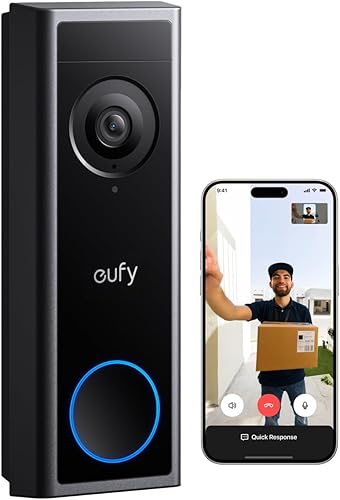
| eufy Video Doorbell C31 | avoiding monthly fees | 2K FHD | Rechargeable battery or hardwiring; wired mode requires the battery and chime bypass | 7.0 |
The best battery video doorbells for different needs
Choose Ring for straightforward visitor checks, Wyze or eufy for local storage, Arlo for smart home connections, or Blink for replaceable batteries. Within Ring's range, the main decisions are battery access and how much image detail you need.
Ring Battery Doorbell 2K
- Retinal 2K video
- Up to 6x Enhanced Zoom
- Live View and Two-Way Talk
- Built-in rechargeable battery
A practical starting point for live visitor checks, conversations and motion alerts. Choose it if removing the whole doorbell for charging fits your routine.
Pros
- Wide-angle video with zoom
- Live View and Two-Way Talk
- Motion notifications on your phone
Cons
- USB-C cable is not included
- Replay and AI alerts require a compatible Ring Protect subscription
The Ring Battery Doorbell 2K suits households that mainly want to check a delivery, answer a visitor or see what caused an alert. Its Retinal 2K video and up to 6x Enhanced Zoom provide a wide entrance view with the option to inspect a smaller area.
Live View and Two-Way Talk let you speak to someone without opening the door. It also works with select Alexa devices, including custom notifications on Echo Dot and video viewing on Echo Show.
The maintenance trade-off is its built-in battery. You'll detach the whole doorbell with the included removal tool and charge through USB-C; a cable isn't included.
Buy this model if you can reach the mount easily and don't mind taking the camera indoors for charging. Skip it for the Plus if handling only a battery pack would be more convenient.
Replay and AI-powered alerts need a compatible Ring Protect subscription. Decide whether you need saved events before choosing it mainly for motion notifications.
Ring Battery Doorbell 2K Plus
- Retinal 2K video
- Up to 6x Enhanced Zoom
- Night Vision
- Quick Release Battery Pack
Choose the Plus when removing only the battery pack makes charging more manageable. Its Night Vision also suits entrances used after sunset.
Pros
- Removable battery pack
- Color Night Vision in low light
- Live View and Two-Way Talk
Cons
- Replay and AI alerts require a compatible Ring Protect subscription
- Color Night Vision needs some available light
The Ring Battery Doorbell 2K Plus is the better Ring choice when battery access drives the decision. Its Quick Release Battery Pack comes out for charging while the doorbell stays mounted.
That makes it a sensible upgrade for someone who wants a simpler removal routine. Removing the pack still interrupts operation unless you arrange a compatible charged replacement, so don't confuse easier access with uninterrupted coverage.
The Plus retains the standard model's resolution and zoom range. Its Night Vision stays in color in low light, then switches to black and white in total darkness.
Choose it for an entrance used after sunset and a charging routine centered on a removable pack. Skip it if you rarely need those benefits and are comfortable detaching the standard Ring.
Live View, Two-Way Talk and motion notifications cover daily use. As with the other Ring picks, replay and AI alerts require compatible Ring Protect service.
Ring Battery Doorbell 4K Pro
- Retinal 4K video
- Up to 10x Enhanced Zoom
- Radar-powered 3D Motion Detection
- Quick Release Ultra Battery Pack
The highest-resolution choice here suits buyers who want to inspect activity across a larger entrance. It combines extended zoom with radar-powered motion detection.
Pros
- Highest resolution in this group
- Extended zoom range
- Removable Quick Release Ultra Battery Pack
Cons
- Replay and AI alerts require a compatible Ring Protect subscription
- Extra resolution has less value for simple close-range checks
The Ring Battery Doorbell 4K Pro suits buyers who want to examine activity across a larger entrance. Its Retinal 4K video and up to 10x Enhanced Zoom give it the highest resolution and longest zoom range in this group.
Choose it when your usual question is about activity beyond the person standing directly at the bell. A deeper porch or longer approach gives you a clearer reason to prioritize detail over a simpler model.
Radar-powered 3D Motion Detection handles motion alerts, and Two-Way Talk with Audio+ supports visitor conversations. Ring calls its removable Quick Release Ultra Battery Pack its fastest-charging battery yet.
The Pro also offers color viewing in low light and switches to black and white in total darkness. Replay and AI alerts require a compatible subscription.
Skip it if you mainly need to recognize someone at arm's length. Extra pixels can't repair a blocked camera angle, poor placement or an unreliable connection.
Wyze Battery Video Doorbell
- 1536 x 1536 HD+ video
- 1:1 head-to-toe view
- MicroSD support up to 256 GB
- Wire-free or AC hardwired
A square view helps frame visitors and packages close to the door, while microSD support provides local storage. AC wiring adds continuous local recording.
Pros
- Head-to-toe view for visitors and parcels
- Local microSD storage
- Battery and AC wiring options
Cons
- MicroSD card and chime options are sold separately
- Continuous local recording requires AC wiring
The Wyze Battery Video Doorbell fits a porch where packages land close to the door and local recording matters. Its square, 1:1 view covers visitors from head to toe and parcels near the doorstep.
It records 1536 x 1536 HD+ video and supports a microSD card up to 256 GB, sold separately. Choose a card using FAT32 or exFAT, the supported formats.
Battery power lets you begin without doorbell wiring. If you later want continuous local recording, that feature requires AC hardwiring as well as the card.
Wyze claims up to 6 months of battery life, but your maintenance schedule will depend on use. The built-in battery charges after you detach the doorbell, and a USB-C cable is included.
Choose Wyze if you want local storage now and a possible wired recording setup later. Skip it if you expect battery-powered, round-the-clock recording or an included indoor chime.
Compatible Wyze chime options are sold separately. The included corner plate can help aim the camera toward the approach.
Arlo Video Doorbell 2K (2nd Gen)
- 2K video
- Wired or wireless installation
- Advanced detection with a paid plan after trial
- Alexa, Apple Home and Google Home compatibility
Arlo suits buyers connecting a doorbell with other smart home devices. It offers wireless installation or wired trickle charging, with basic alerts and live streaming available without a subscription.
Pros
- Broad smart home compatibility
- Activity zones and privacy zones
- Battery or wired trickle charging
Cons
- Advanced detection and 60-day history require a paid plan after the trial
- Wired trickle charging needs existing doorbell wiring
The Arlo Video Doorbell 2K (2nd Gen) suits households that want the doorbell to join a broader smart home setup. It supports Alexa, Apple Home, Google Home, SmartThings and IFTTT.
Check that the particular routine you want is supported before choosing by platform name alone. Turning on another device and viewing a camera feed are different tasks.
Arlo offers wireless installation or wired trickle charging. Its head-to-toe view helps frame both visitors and deliveries, while activity zones and privacy zones let you define relevant and sensitive areas.
Live streaming and basic alerts work without a subscription. Advanced detection and 60-day video history require a paid Arlo Secure plan after the trial.
Choose Arlo if its connections and zone controls fit your entrance. Skip it if your priority is keeping saved video without an ongoing cloud plan.
Quick replies and phone video calls add ways to answer visitors. Plan who will receive those calls so several household members don't all respond at once.
Blink Battery Doorbell 2K+
- 2K head-to-toe view
- Three AA Energizer lithium batteries included
- Two-way audio with noise cancellation
- IP65 weather resistance
Replaceable AA lithium batteries suit households that prefer a battery change to a charging session. The included Sync Module Core needs indoor power.
Pros
- Included batteries and Sync Module Core
- Head-to-toe view
- Two-way audio with noise cancellation
Cons
- Person detection requires a compatible subscription
- Existing wiring provides the in-home ring option described here
The Blink Battery Doorbell 2K+ suits people who prefer replacing batteries to waiting for a rechargeable pack. It includes 3 AA Energizer lithium batteries, and Blink claims months of power.
Keep the specified replacement batteries available so a low-battery warning becomes a short maintenance task. Don't assume other AA battery types will provide the same operation.
The included Sync Module Core needs an indoor outlet and has its own USB-C cable and power adapter. Plan that indoor location as well as the doorbell's position.
A head-to-toe view covers faces and deliveries, and two-way audio includes noise cancellation. Person detection requires a compatible Blink subscription.
Choose Blink if avoiding charging sessions is your main goal. Skip it if you want a rechargeable system or person detection without a plan.
Wire-free installation sends doorbell press alerts to the Blink app. Connecting existing doorbell wiring provides the in-home ring option described for this model.
eufy Video Doorbell C31
- 2K FHD video
- Rechargeable 6,500mAh battery
- Local microSD storage up to 128 GB
- 24/7 recording with compatible hardwiring and storage setup
The C31 fits buyers who want local recordings without a storage subscription. Its optional continuous recording requires compatible wiring and a supported storage setup.
Pros
- Local storage without a subscription fee
- Quick-release rechargeable battery
- Video calls, quick responses and visitor voice messages
Cons
- MicroSD card is sold separately
- Continuous recording requires compatible wiring, chime bypass and supported storage
The eufy Video Doorbell C31 suits buyers who want local recordings without a subscription fee. It supports a separately purchased microSD card up to 128 GB and uses a quick-release rechargeable battery.
Its 2K FHD camera has a 4:3 view. Doorbell presses bring a video call to your phone, with quick responses and visitor voice messages available when you can't answer.
Choose it for local storage on a battery setup, with the option to plan a more involved wired installation later. Skip it if you want continuous recording without changing the power arrangement.
Continuous recording and 5-second pre-roll require 16 to 24V hardwiring with the existing chime bypassed. The battery must stay inserted in wired mode.
For continuous recording, use standalone mode or HomeBase S380; HomeBase S280 and MiniBase don't support that feature. Turn off power at the circuit breaker before replacing the battery or installing an SD card, following eufy's instructions.
How should you choose a battery video doorbell?
Choose around the job you need done: answering visitors, watching deliveries or reviewing events later. Then work through view, power, recording and indoor alerts in that order.
What makes the best battery video doorbell for your porch?
The best fit shows both the visitor's face and the area where deliveries land. A wide image isn't automatically useful if your wall, railing or open screen door blocks part of it.
Look at the entrance from the proposed mounting position. Note where people stand, which direction they approach and whether parcels usually sit beside or directly below the bell.
A head-to-toe view is useful for deliveries, while extra zoom can help inspect more distant activity. Neither replaces aiming the camera at the area you actually need.
Is 2K or 4K better for a battery video doorbell?
Choose 2K for ordinary close-range visitor checks, and consider 4K when inspecting smaller details farther into the entrance is a priority. Camera position and available light should come before pixel count.
Zoom enlarges part of the image, so ask what you expect to inspect. Reading detail at a distance is a different task from seeing that a person has arrived.
For evening use, consider porch lighting as part of the setup. Color night viewing still depends on available light on the Ring Plus, Ring Pro and Blink models described here.
Which battery setup is easiest to maintain?
Choose the battery system you can service consistently. Built-in batteries mean removing the camera, removable packs mean handling the pack, and replaceable batteries mean keeping the correct replacements ready.
Think about access before installation. A mount behind a plant, beside a tight corner or above comfortable reach can turn routine charging into a chore.
Don't assume a larger battery capacity proves longer life across different cameras. Recording activity, live viewing and settings all affect how often you'll need to intervene.
Our guide to how long Ring doorbell batteries last explains the main factors. Use the first few battery readings at your own entrance to set a realistic reminder.
Do you need local storage or a subscription?
Choose local storage if avoiding a recurring storage fee is central to your decision. Choose a cloud plan when its history and alert features match how you expect to use the camera.
Separate 3 questions: can you view live video, can you save events, and can you receive specific detection alerts? Access to one doesn't establish access to the others.
Local cards also need management. Check that recording is enabled, confirm clips can be opened and save important footage somewhere else before it is overwritten.
A card inside an outdoor camera can leave with the device if it is removed. Cloud storage has different access and subscription requirements, so decide which trade-off you prefer.
Our guide to video doorbells with no subscription helps narrow the choice if ongoing fees are your main concern.
Can a battery doorbell work with existing wiring?
Some can, but wiring may provide charging, continuous power or an indoor ring rather than the same result on every model. Match the wiring function to your goal before arranging installation.
Don't assume connecting wires removes every battery task. Arlo describes wired trickle charging, while eufy's wired mode still requires the battery to remain inserted.
Also check what happens to the existing chime. A setup that bypasses it needs a separate plan for hearing visitors indoors.
Use each model's installation instructions to confirm electrical requirements and supported equipment. If you're unsure about the transformer or wiring, have a qualified installer check it before connecting anything.
Will everyone hear the doorbell indoors?
Plan an indoor alert if household members won't reliably notice a phone notification. A sleeping phone, muted sound or a device left upstairs can make app-only alerts inconvenient.
Accessories differ between these picks, so don't assume a chime or hub is included. Blink includes its Sync Module Core, while Wyze's compatible indoor chime options are separate.
Our guide to whether you need a chime with a video doorbell explains the choices. Decide how the bell should reach the whole household before buying accessories.
How should you set up a battery doorbell?
Set up the app and check the view before making permanent holes. Confirm Wi-Fi works at the closed front door, since a strong signal elsewhere in the house doesn't settle that question.
Hold the camera at the intended position while another person stands where a visitor normally waits. Check the doorstep too, including the spot where a small parcel would sit.
For a rental, confirm permission for the mounting method. A battery model avoids running new power wiring, but it doesn't automatically make drilling or adhesive mounting acceptable.
Follow the supplied mounting instructions and leave room to release the camera or battery. Make sure opening the door won't strike it and that nearby trim won't block the lens.
After mounting, walk up the usual path, press the bell and check the alert on the phone that will receive it. Try a short conversation with the door closed to confirm the audio is usable.
Next, confirm that the recording method you chose actually saves a clip. Being able to watch live video doesn't prove you can retrieve an event later.
For a wider installation checklist, use our guide to installing a video doorbell. If connection quality is uncertain, our guide to whether video doorbells need Wi-Fi explains that part of the setup.
How can you reduce nuisance alerts and battery work?
Aim alerts at the entrance rather than every movement beyond it. Where supported, adjust motion settings and activity zones so public sidewalks, passing traffic or moving branches don't dominate notifications.
Change one setting at a time and check whether visitors still trigger useful alerts. Turning sensitivity down too far can quiet the phone while also missing the approach you wanted to see.
Avoid repeatedly opening live video just to check battery status or watch an empty porch. More camera activity can mean more frequent maintenance.
Keep the lens clear with a soft cloth and follow the brand's cleaning directions. Water spots, dust and spider webs can obstruct the picture even when the camera is working.
Check the mount and charging contacts during routine maintenance. Let wet parts dry before charging, and follow the device's charging instructions.
Before traveling, check battery level, recording access and notification permissions. Make sure another authorized household member knows how to respond if you'll be unavailable.
Which mistakes should you avoid before buying?
Avoid choosing a battery doorbell for a feature that works only when wired. Continuous recording is the clearest example among the Wyze and eufy options here.
Other common mistakes can be caught before ordering:
- Choosing by resolution alone: confirm that the camera can see faces and the delivery area from your mounting spot.
- Assuming alerts include recordings: decide how you'll retrieve an event after the notification has passed.
- Forgetting indoor sound: account for anyone who won't carry a phone around the house.
- Overlooking extra equipment: budget for any required card, chime, replacement batteries or indoor power location.
- Treating battery claims as a schedule: plan around your entrance's actual activity and battery readings.
- Expecting wiring to do everything: check whether it powers the camera, charges a battery or operates a chime.
Also place the camera with neighboring doors and windows in mind. Use available privacy controls and frame the entrance you need to monitor.
Which battery video doorbell should you choose?
Choose the best battery video doorbell for your maintenance routine and recording needs. Start with the Ring Battery Doorbell 2K for everyday visitor checks, then move to another model only for a benefit you'll use.
- Choose Ring Plus if removing only the battery pack makes upkeep easier.
- Choose Ring Pro if extra image detail across a larger entrance justifies the upgrade.
- Choose Wyze for doorstep framing and local storage, with wired continuous recording as a possible later step.
- Choose Arlo when smart home connections and zone controls matter most.
- Choose Blink if replacing batteries suits you better than recharging.
- Choose eufy C31 for local storage without a subscription, provided you understand its wired recording requirements.
Before ordering, settle where the camera will mount, how recordings will be saved and how everyone indoors will hear the bell. If reliable power is the remaining question, use our wired versus battery video doorbell comparison to make the final call.
Our top 3 picks at a glance
-
1
-
2
-
3
Frequently asked questions
Which battery video doorbell is best for most homes?
The Ring Battery Doorbell 2K is the best battery video doorbell here for everyday visitor checks and motion alerts. Choose the Plus if removing only a battery pack would make charging easier, or choose Wyze if saving recordings locally matters more than staying within Ring.
Do battery video doorbells need a subscription?
Not always. Wyze supports local microSD recording, and the eufy C31 offers local storage without a subscription fee, with cards sold separately.
Ring replay and AI alerts require compatible Ring Protect service; Blink person detection also needs a compatible subscription.
Choose based on the features you'll actually use.
How often do you need to recharge a battery doorbell?
Recharge frequency depends on activity, settings, weather and how often you open live video. Wyze claims up to 6 months, while Blink claims months from replaceable lithium batteries.
Use your own battery readings to plan maintenance; our guide to how long Ring doorbell batteries last explains the main variables.
Can you hardwire a battery video doorbell?
Some models support wiring, but wiring can serve different purposes. Arlo offers trickle charging, while Wyze supports AC power for continuous local recording.
The eufy C31 requires its battery inserted and a chime bypass in wired mode.
Our wired versus battery doorbell guide explains the broader trade-offs.
What should you check before choosing a wireless doorbell?
Check Wi-Fi at the mounting spot, the view of your doorstep, battery access and your recording plan. Decide how you'll hear the bell indoors and where any required accessories will go.
Our guide to wireless video doorbells helps you compare those choices before you commit to a setup.


