7 Best Wired Video Doorbells (October 2026)
The best best wired video doorbells include the Ring Wired Doorbell 4K Pro for busy front entrances, the eufy Video Doorbell E340 for frequent package deliveries, and the Ring Wired Doorbell 2K for Alexa-centered homes.
On this page (9 sections)
- How we chose the best wired video doorbells
- Compare the best wired video doorbells
- Which wired video doorbell fits your home?
- What should you check before buying a wired doorbell?
- How should you compare recording and subscription options?
- How do you set up a wired video doorbell well?
- What common wired doorbell mistakes should you avoid?
- How do you care for a wired video doorbell?
- Which best wired video doorbell should you choose?
The best wired video doorbell for most homes is the Ring Wired Doorbell 4K Pro, especially if you want detailed video and more precise motion alerts. The eufy Video Doorbell E340 is the stronger match for frequent deliveries and local storage without a subscription.
Choose around your doorway first: where visitors stand, where parcels land and how you'll hear a ring inside. A camera with the right view and alert setup will serve you better than one chosen on resolution alone.
Hardwired power can remove routine charging from your schedule, but it doesn't settle recording, Wi-Fi or chime compatibility. Some battery-capable models also accept wiring, so check what that connection actually powers.
For a broader look at doorbell types, start with our best video doorbells for your front door. If you're deciding between a fixed power connection and a battery, see our wired vs battery video doorbells guide.
Our picks at a glance
-
1

-
2

-
3

- 4
 Best for softly lit porchesCheck it
 - 5
 Best for doorstep delivery viewsCheck it
 - 6
 Check it
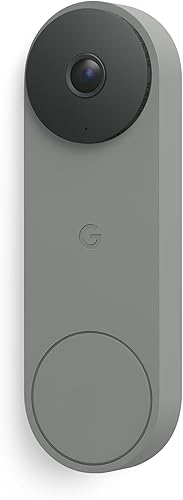
Google Nest Doorbell Wired (3rd Gen)
Best for Google Home households - 7
 Check it
Reolink Video Doorbell WiFi 2K
Best for phone-free indoor alerts
How we chose the best wired video doorbells
We compared camera coverage, power requirements, recording options and indoor alerts to identify who each doorbell suits. The order reflects the scores, while the buyer notes explain when a lower-ranked choice makes more sense.
A high-resolution camera earns its place when you need to inspect details within its view. A separate package camera, included chime or clear local-storage option can matter more for a different household.
We also separated constant power from recording behavior. Keeping a doorbell powered doesn't automatically mean it saves video continuously, and a subscription feature shouldn't be confused with a built-in one.
Compare the best wired video doorbells
Start with view, storage and indoor alerts, then rule out models that don't fit your power or network setup. The comparison below highlights the differences before the individual recommendations.
| Product | Best for | Our score |
|---|---|---|
| Ring Wired Doorbell 4K Pro | busy front entrances | 8.7 |
| eufy Video Doorbell E340 | frequent package deliveries | 8.6 |
| Ring Wired Doorbell 2K | Alexa-centered homes | 8.5 |
| Ring Wired Doorbell 2K Plus | softly lit porches | 8.2 |
| Blink Wired Doorbell 2K+ | doorstep delivery views | 7.9 |
| Google Nest Doorbell Wired (3rd Gen) | Google Home households | 7.4 |
| Reolink Video Doorbell WiFi 2K | phone-free indoor alerts | 7.2 |
Which wired video doorbell fits your home?
Choose the 4K Pro for image detail, eufy for parcel coverage and local storage, or Reolink for an included indoor chime. The remaining picks suit households with specific lighting, alert or smart-home priorities.
Ring Wired Doorbell 4K Pro
- Retinal 4K video
- Up to 10x Enhanced Zoom
- 3D Motion Detection
- Low-Light Sight
The highest resolution in this group pairs with 3D Motion Detection for entrances where detail and alert control matter. Live View and Two-Way Talk with Audio+ support visitor conversations.
Pros
- Highest video resolution here
- Up to 10x Enhanced Zoom
- 3D Motion Detection
Cons
- Video Descriptions require a compatible Ring subscription and are unavailable in Illinois
- Requires compatible hardwired power
The Ring Wired Doorbell 4K Pro suits a busy entrance where you want to inspect both visitors and activity farther within the camera's view. Its Retinal 4K video and up to 10x Enhanced Zoom give it the strongest resolution-and-zoom combination here.
Ring's 3D Motion Detection is designed to pinpoint movement for more precise alerts. That makes this the first pick to consider when useful notifications matter as much as the picture.
Low-Light Sight provides color with some ambient light and switches to black and white in total darkness. Live View and Two-Way Talk with Audio+ let you answer a visitor from your phone.
Video Descriptions require a compatible Ring subscription and are unavailable in Illinois. Decide whether those written notifications are part of your reason for buying before choosing a plan.
Skip it if package placement or built-in local storage is your main concern. Eufy's separate downward camera addresses the doorstep more directly, and extra zoom won't reveal an area outside the camera's view.
eufy Video Doorbell E340
- Dual cameras
- 2K video
- 8GB built-in local storage
- Wired or battery power
Separate visitor and package cameras suit homes with frequent deliveries. Built-in local storage avoids a subscription fee, while wired power continuously tops up the rechargeable battery.
Pros
- Separate visitor and package views
- Built-in 8GB local storage without a subscription
- Wired or battery operation
Cons
- Only supports 2.4 GHz Wi-Fi
- Pre-recording setup requires bypassing the existing chime
The eufy Video Doorbell E340 is the pick for homes where deliveries regularly land below a visitor's face. Its front camera covers visitors head-to-toe, while a second camera points down toward packages.
It pairs 2K video with 8GB of built-in local storage without a subscription fee. Wired operation tops up its rechargeable battery, so this is a battery-capable design with a wired option.
For wired use, it accepts a 16–24V power source. Eufy specifies constant power from a 16–24V, 30VA transformer and an existing-chime bypass for pre-recording, so decide which setup you want before installation.
The E340 otherwise supports an existing mechanical chime and compatible eufy, Alexa and Google Assistant devices. It uses 2.4 GHz Wi-Fi only and doesn't support Apple HomeKit.
Eufy states a nighttime viewing distance of up to 16 ft with its dual-light color night vision. Skip it if you specifically want a battery-free design or need HomeKit, and confirm the chime trade-off if pre-recording matters.
Ring Wired Doorbell 2K
- Retinal 2K video
- Up to 6x Enhanced Zoom
- Live View and Two-Way Talk
- Alexa support
A direct choice for visitor conversations and alerts through select Alexa devices. Recorded history and some intelligent alerts require a compatible Ring Protect subscription.
Pros
- Up to 6x Enhanced Zoom
- Live View and Two-Way Talk
- Works with select Alexa devices
Cons
- Video history and some alerts require a compatible Ring Protect subscription
- Requires compatible hardwired power
The Ring Wired Doorbell 2K suits an Alexa-centered home that needs visitor conversations and notifications without choosing the highest-resolution model here. It combines Retinal 2K video with up to 6x Enhanced Zoom.
Live View and Two-Way Talk cover real-time visitor interactions. Select Alexa devices can provide custom notifications, while compatible Echo displays can show video.
That setup is useful if household members spend time near an Echo rather than carrying a phone from room to room. Confirm that the devices you plan to use support the functions you want.
A compatible Ring Protect subscription is needed to rewatch missed video and use some intelligent alerts. Opening a live feed and returning later to find a saved event are different needs.
Buy it for everyday door answering within an Alexa setup. Skip it if subscription-free saved footage is essential, and read the Ring doorbell subscription guide before making recorded history part of your plan.
Ring Wired Doorbell 2K Plus
- Retinal 2K video
- Motion Detection
- Low-Light Sight
- Hardwired power
Low-Light Sight suits porches that retain some ambient light after dark. It shows color in low light and switches to black and white in total darkness.
Pros
- Color video with some ambient light
- Mobile motion alerts
- Multiple exterior finishes
Cons
- Video Descriptions require a compatible Ring subscription and are unavailable in Illinois
- Video quality can vary with bandwidth and device temperature
The Ring Wired Doorbell 2K Plus suits a porch that keeps some light after sunset. Its Low-Light Sight can retain color in those conditions, then switches to black and white in total darkness.
This distinction matters if you leave a porch light on or have nearby ambient light. Don't choose it expecting color footage from a completely dark entrance.
It captures Retinal 2K video and sends mobile notifications through Motion Detection. Ring notes that video quality can vary with internet bandwidth and device temperature.
Video Descriptions require a compatible Ring subscription and are unavailable in Illinois. Multiple finishes provide another reason to consider it if you want the doorbell to suit your exterior.
Choose it when porch lighting and appearance guide the decision. Skip it if you want the 4K Pro's higher resolution and 3D Motion Detection, or if separate package coverage would help more than this camera's low-light approach.
Blink Wired Doorbell 2K+
- Head-to-Toe 2K View
- Person detection with a compatible subscription
- Two-way audio with noise cancellation
- IP65 weather resistance
Head-to-Toe 2K View covers visitors and deliveries near the mat. Plan for Alexa or a separate Blink Chime if you want an indoor ring.
Pros
- Head-to-Toe 2K View
- Two-way audio with noise cancellation
- IP65 weather-resistant design
Cons
- Person detection requires a compatible Blink subscription
- Alexa or a separately sold Blink Chime is required for in-home alerts
The Blink Wired Doorbell 2K+ suits a doorway where you want visitors and deliveries near the mat in the frame. Its Head-to-Toe 2K View is the main reason to put it on your shortlist.
Two-way audio includes noise cancellation for visitor conversations. Its night vision shows color in low light and changes to black and white in near darkness.
The IP65 weather-resistant design is intended for outdoor exposure. Mounting still matters: keep the camera clear of objects that block the view and follow Blink's placement instructions.
Plan indoor alerts before ordering. This model requires Alexa or a separately sold Blink Chime for an in-home ring, and person detection needs a compatible Blink subscription.
Buy it if its framing fits your doorstep and you're comfortable arranging those extras. Skip it if you expect the existing doorbell wires to preserve your old indoor ring automatically, or if person-only notifications without a plan are a firm requirement.
Google Nest Doorbell Wired (3rd Gen)
- 2K HDR video
- 166° field of view
- Night vision
- Gemini features with Google Home Premium
A fit for households that want their doorbell within Google Home. Gemini features require Google Home Premium, and detailed notification descriptions and summaries require its Advanced subscription.
Pros
- 2K HDR video
- 166° field of view
- Encrypted video and two-step verification
Cons
- Gemini features require Google Home Premium
- Detailed descriptions and summaries require the Advanced subscription
The Google Nest Doorbell Wired (3rd Gen) is the choice for a household that wants to manage its entrance through Google Home. It combines 2K HDR video, night vision and a 166° field of view.
The wired design removes battery recharging and replacement from routine use. Google Account security features include encrypted video and two-step verification, with a green LED showing when the doorbell is processing or streaming video.
Its subscription tiers deserve a close look. Gemini features require Google Home Premium, while more detailed notification descriptions and event summaries require the Advanced subscription.
Those tools suit someone who wants more context from notifications rather than opening every alert. Work out whether that extra detail would change how you use the camera before committing to a plan.
Choose Nest when Google Home is central to your household. Skip it if you're mainly seeking a simple recording setup without recurring plans, since the Gemini features highlighted here depend on a subscription.
Reolink Video Doorbell WiFi 2K
- 2K video
- 4:3 view with a 180° viewing angle
- Indoor chime included
- 24/7 recording support
An included plug-in chime suits homes that need an audible ring away from a phone. Dual-band Wi-Fi and continuous recording support offer more setup choices.
Pros
- Indoor chime included
- 2.4 GHz and 5 GHz Wi-Fi
- Supports 24/7 recording and pre-recording
Cons
- Uses existing doorbell wiring for power only
- Recording setup and accessory compatibility need planning
The Reolink Video Doorbell WiFi 2K suits a home that needs an audible indoor ring without relying on a phone. Its included plug-in chime offers 10 tunes and adjustable volume.
The camera provides a 4:3 image with a 180° viewing angle, and a supplied 15° wedge helps aim it. Check the actual frame at your entrance rather than assuming a wide view will show every package position.
It supports both 2.4 GHz and 5 GHz Wi-Fi. Power requirements are 12–24VAC at 50/60Hz or DC 24V, and existing doorbell wires supply power only.
Reolink supports 24/7 recording and pre-recording, making it worth considering if event clips alone won't meet your needs. Confirm the storage arrangement and required accessories before treating continuous recording as a complete setup.
Reolink recommends its accessories for full compatibility, and its free Rich Notification plan allows up to 25 image notifications daily. Skip it if you expect your existing chime to work through the wiring, or want recording decisions settled without planning storage.
What should you check before buying a wired doorbell?
Check power, network coverage, framing and chime support before comparing extra camera features. A mismatch in any of these areas can turn a straightforward replacement into a larger installation job.
Does your transformer match the wired video doorbell?
Match the exact model's voltage, AC or DC requirements and transformer capacity. Two thin wires beside your door show that wiring exists, but they don't establish that it can power your chosen camera.
Find the transformer information before buying replacement equipment. An old button working normally doesn't prove the same circuit meets a video doorbell's needs.
Read our guide to what transformer a video doorbell needs and how to wire a video doorbell. If you can't identify the supply or safely reach the wiring, use a qualified installer.
Will Wi-Fi reach the installed position?
Check network coverage at the doorbell's mounting spot, with the front door closed. A strong connection inside the hallway may weaken across exterior walls, metal doors or other barriers.
Match the supported Wi-Fi band, then consider router or access-point placement if coverage is poor. Wiring for power doesn't turn these Wi-Fi models into wired-network cameras.
Don't select a band on its name alone. The useful choice is the supported connection that remains reliable where the doorbell will sit.
Will the best wired video doorbell see your doorstep?
Choose framing around faces, package placement and the approach to your door. Resolution describes detail within the picture; camera angle determines what enters that picture.
Before drilling, hold the mounting template in place and consider door trim, side walls and how close visitors stand. A wedge may improve the angle, but it can't see through an obstruction.
If deliveries are the priority, check the floor area immediately below the camera. A wider horizontal view and a downward-facing package camera solve different coverage problems.
Do you need an indoor chime?
Choose how everyone in the home will hear visitors, including people who don't use the app. Phone notifications alone may be a poor fit for a large home or someone who often leaves their phone charging.
Separate the power connection from the chime connection. A doorbell can use your existing wires while requiring a different device for indoor sound.
Our guide to whether you need a chime with a video doorbell explains the choices. Confirm the exact installation mode too, since features such as pre-recording can change chime requirements.
How should you compare recording and subscription options?
Choose based on what you need to retrieve later, not just what you can watch live. Live View, saved motion clips, pre-recording and continuous recording serve different purposes.
Live video helps you answer someone now. Saved clips help after a missed alert, while pre-recording can add context before an event and continuous recording covers longer periods when supported and configured.
Write down your must-have functions before comparing plans: saved footage, person detection, package views or written event descriptions. Check each function separately rather than assuming one subscription rule covers everything.
Local storage also needs attention. Finite capacity means you should understand retention, how older recordings are handled and how to save an important clip before it disappears.
Our local-storage video doorbell guide is not needed to make this choice; the key is confirming where footage is kept and how you retrieve it.
For a closer comparison of plan-free choices, use our best video doorbells with no subscription guide. Decide whether you want to avoid all recurring plans or simply don't need the advanced alerts they provide.
How do you set up a wired video doorbell well?
Start with compatible power and a clear camera position, then configure alerts after installation. Following that order helps you avoid blaming camera settings for a wiring, angle or network problem.
- Check the full circuit. Identify the transformer, existing chime and any connector or bypass required by the model's instructions.
- Turn off circuit power before handling wires. Use a qualified installer if you can't safely identify the circuit or the work involves mains wiring.
- Confirm the mounting position. Check door movement, trim clearance and the likely visitor position before making holes.
- Fit the specified hardware. Follow the instructions for wire routing, connectors, mounting and any required sealing.
- Complete app and account setup. Use a unique password, enable extra account verification where available and grant household access through supported sharing tools.
- Check the whole visitor path. Press the button, confirm indoor sound and phone alerts, open the live view and try a two-way conversation.
After dark, inspect the view again. Porch lights, nearby walls and reflective surfaces can change the picture, so a useful daytime angle may need adjustment.
Start with a motion area that covers your entrance rather than the whole street, where the camera supports that control. Check notification behavior with someone approaching normally, then narrow unwanted activity without cutting out the route visitors use.
Give shared access to the people who need it instead of passing around one account password. Make sure each person understands how to answer a ring and find a saved event.
What common wired doorbell mistakes should you avoid?
Avoid assuming constant power means constant recording, and don't treat an existing chime as automatically compatible. These are separate choices that need separate checks.
Buying for zoom before checking the view
Zoom helps inspect what the camera captures, but it can't recover a parcel hidden below the frame. Choose the right angle and coverage before paying attention to magnification.
A visible stretch of driveway can also distract from a poorly framed visitor. Put the area where people stop ahead of a broad view you rarely need.
Setting every alert to reach every phone
Too many notifications make useful ones easier to ignore. Decide who needs routine motion alerts, who needs button presses and whether supported schedules or zones can reduce interruptions.
Don't assume person detection means every notification will suit your needs immediately. Check your actual approach path and adjust the available controls after normal household activity.
Saving footage without a retrieval plan
A recording helps only if you can find and save it when needed. Learn the event filters, download process and storage limits before an important incident.
Keep account access current when someone moves out or no longer needs it. Review camera sharing separately from general household Wi-Fi access.
Ignoring other people's space
Aim the camera at your entrance and reduce unnecessary coverage of neighboring doors or windows. Use privacy masks where supported, and check local requirements before recording shared areas or audio.
For help putting these choices in order, see how to choose a video doorbell.
How do you care for a wired video doorbell?
Keep the lens clear, alerts useful and account access current. Wired power reduces charging work, but the camera still needs occasional attention.
Wipe the lens gently with a clean microfiber cloth, following the brand's cleaning instructions. Check for webs, dust or water marks when the picture looks hazy, especially after rain or yard work.
Inspect the mount for movement and keep plants or decorations from blocking the view. Avoid spraying water directly into the unit or disturbing wiring while cleaning.
Use supported software updates and revisit motion settings when seasons change. Moving branches, holiday decorations and a changed delivery spot can make old settings less useful.
Occasionally confirm that the indoor ring still reaches the rooms where you need it. Also check that saved footage opens correctly and that important household members still receive the right alerts.
Which best wired video doorbell should you choose?
Choose the best wired video doorbell for the job your current setup can't do. Pick the Ring Wired Doorbell 4K Pro for detailed views and motion control, or the eufy E340 when parcels and subscription-free local storage drive the decision.
Choose Ring 2K for an Alexa-centered routine, Ring 2K Plus for a softly lit porch, or Blink when its head-to-toe framing suits your doorstep. Nest belongs on the shortlist for Google Home households, while Reolink suits buyers planning indoor sound and continuous recording.
Before ordering, settle 3 things: compatible power, how you'll hear visitors and where saved video will live. Then follow our video doorbell installation guide to plan the work.
Our top 3 picks at a glance
-
1
-
2
-
3
Frequently asked questions
What is the best wired video doorbell?
The Ring Wired Doorbell 4K Pro is our top choice when image detail and motion detection matter most. The eufy Video Doorbell E340 better suits frequent deliveries and subscription-free local storage, while the Reolink Video Doorbell WiFi 2K suits buyers who want an included indoor chime.
Can a wired video doorbell work without a subscription?
Yes, but compare the features you need without a plan; the eufy Video Doorbell E340 includes 8GB of local storage without a subscription fee. Other models attach plans to specific tools, such as Blink person detection, Ring video history and some alerts, or Nest's Gemini features.
Do wired video doorbells need existing doorbell wiring?
They need a compatible power source, but existing wires alone don't prove compatibility; check voltage, AC or DC requirements, transformer capacity and the installation instructions for your exact model. If your home lacks suitable wiring, have a qualified installer assess the work before choosing a permanently wired doorbell.
Will a wired video doorbell ring my existing chime?
Only if the doorbell and installation setup support it; the eufy E340 can use an existing mechanical chime, but its pre-recording setup requires bypassing that chime. Reolink includes a separate plug-in chime; our guide to video doorbells and chimes explains what to check before buying.


