6 Best Video Doorbells With Local Storage (October 2026)
The best doorbell cameras with local storage include the eufy Video Doorbell E340 for frequent deliveries, the Wyze Battery Video Doorbell for busy entrances, and the BOIFUN 2K Video Doorbell for unwired entrances.
On this page (7 sections)
- How we chose each doorbell camera with local storage
- The best doorbell cameras with local storage
- What should you check before choosing local storage?
- How should you set up local recording?
- How do you keep local recording useful over time?
- Which local-storage mistakes should you avoid?
- Which doorbell camera with local storage should you choose?
The eufy Video Doorbell E340 is the best doorbell camera with local storage for most homes because it combines built-in memory with separate views of visitors and packages. Choose a wired recording option instead if you need to review activity between motion alerts.
The choice starts with what you want to save: short event clips or a continuous timeline. Then decide whether you want memory built into the camera, a removable card, or a compatible recording system.
If avoiding monthly fees is your main concern, compare our best video doorbells with no subscription. Our guides to Ring's subscription requirements and Blink's subscription options explain those brands' options.
Our picks at a glance
-
1

-
2

-
3
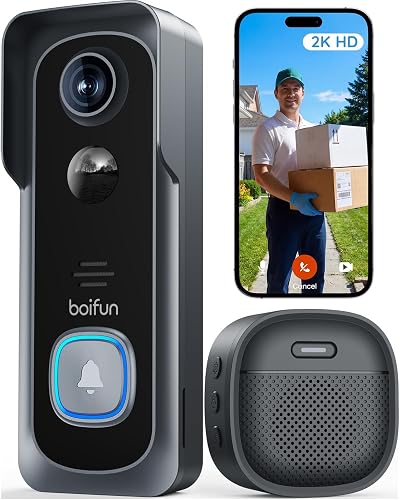 Best for unwired entrances
BOIFUN 2K Video Doorbell, No Subscription
7.3/10 our score
See it on Amazon
- 4
 Check it
Reolink Video Doorbell WiFi 2K
Best for permanent installations - 5
 Best for easy battery swapsCheck it
 - 6
 Best for phone-free door alertsCheck it
How we chose each doorbell camera with local storage
We prioritized usable local recording, suitable power options and a clear reason to choose each model. A doorbell needs to fit your entrance and recording habits, not just offer a storage feature.
Built-in memory suits someone who wants fewer parts to buy and manage. A card slot suits someone willing to choose compatible media and maintain it, while continuous recording calls for closer attention to power and storage.
Camera framing also matters. Seeing a visitor's face and seeing a parcel against the threshold are different jobs, so we considered dedicated downward views and taller image shapes alongside recording options.
The 3 eufy entries use the same E340 camera design. They are bundle choices, so pick the package that solves your setup needs rather than expecting a different picture from each one.
| Product | Best for | Storage | Power | Wi-Fi | Our score |
|---|---|---|---|---|---|
| eufy Video Doorbell E340 | frequent deliveries | Built-in 8GB | Rechargeable battery or 16–24V wired power | 2.4 GHz | 8.6 |
| Wyze Battery Video Doorbell | busy entrances | MicroSD card up to 256GB, sold separately | Rechargeable battery or AC hardwiring | 7.8 | |
| BOIFUN 2K Video Doorbell, No Subscription | unwired entrances | MicroSD card up to 128GB, not included | Built-in rechargeable battery | 2.4 GHz only | 7.3 |
| Reolink Video Doorbell WiFi 2K | permanent installations | 12–24VAC, 50/60Hz, or 24V DC | 2.4 or 5 GHz | 7.2 | |
| eufy E340 Kit with Battery | easy battery swaps | Built-in 8GB | Rechargeable battery with extra battery included | 2.4 GHz | 7.0 |
| eufy E340 Kit with Chime | phone-free door alerts | Built-in 8GB | Battery, with wired power option | 6.9 |
The best doorbell cameras with local storage
Choose the standard E340 for delivery monitoring, Wyze or Reolink for wired continuous recording, and BOIFUN for battery-powered event clips. The E340 bundles add convenience for charging or indoor alerts.
eufy Video Doorbell E340
- Built-in 8GB local storage
- Dual cameras
- 2K video
- Battery or wired power
Separate visitor and doorstep views suit homes with regular deliveries. Built-in memory saves you from choosing and installing a storage card.
Pros
- No separate storage card needed
- Downward camera covers packages near the door
- Battery or wired installation
Cons
- Supports 2.4 GHz Wi-Fi only
- No Apple HomeKit support
The E340 suits households that get regular deliveries and want storage ready without selecting a card. Its 8GB built-in memory handles local storage, while separate front and downward cameras cover visitors and packages near the door.
The front view captures people head-to-toe, and the lower camera addresses a common doorstep problem: a parcel can sit below a camera aimed at faces. This makes it a better fit for delivery monitoring than choosing by resolution alone.
It records in 2K, and eufy specifies color night vision out to 16 ft. Power comes from a quick-release rechargeable battery or a 16–24V connection that keeps the battery topped up.
Choose it for a home where package visibility and a simple storage setup matter most. Skip it if Apple HomeKit is essential, or if choosing a storage-card capacity is part of your plan.
Its compatible mechanical-chime options need attention during installation. The wired pre-recording configuration requires bypassing the existing chime, so settle the recording mode and indoor alert arrangement together.
Wyze Battery Video Doorbell
- MicroSD support up to 256GB
- 24/7 local recording in AC wiring mode
- Wire-free or wired option
- Head-to-toe view
Choose Wyze for a busy entrance where you want a continuous local timeline. That recording mode requires AC wiring and a separately bought microSD card.
Pros
- Continuous local recording with AC power and a card
- Square view covers visitors and the doorstep
- Battery installation also available
Cons
- Storage card and compatible chime sold separately
- Battery mode does not provide the stated continuous recording option
Wyze is the clearest fit here for someone who wants card-based continuous local recording and can supply AC power. It supports a separately bought microSD card up to 256GB, using FAT32 or exFAT formatting.
That continuous mode needs both the card and AC wiring. A wire-free installation remains an option, but it does not provide the stated all-day recording setup.
The 1536 x 1536 image has a square shape and a 150 x 150-degree view. This framing suits an entrance where you need to see a person's face and a parcel close to the threshold.
Two-way audio and auto-responses help you answer visitors, but compatible Wyze chime options are separate purchases. Include an indoor alert device in your plan if people at home won't always have a phone nearby.
Buy Wyze for the wired recording arrangement, not merely its maximum card size. Skip it if you expect battery power to deliver a continuous timeline or want a package with a chime included.
BOIFUN 2K Video Doorbell, No Subscription
- MicroSD support up to 128GB
- Built-in rechargeable battery
- 2K video
- 2.4 GHz Wi-Fi
BOIFUN suits an entrance without doorbell wiring when event clips meet your needs. An indoor chime is included, and core features work without a subscription.
Pros
- Wire-free operation
- Indoor chime included
- Local playback and human detection without a subscription
Cons
- Storage card not included
- Built-in battery cannot be swapped
- Event recording rather than a continuous timeline
BOIFUN suits an entrance without doorbell wiring when motion and button-press clips cover your needs. It supports a separately bought microSD card up to 128GB and includes an indoor chime.
Its 2K camera has a 166-degree view, with human detection, local playback and two-way audio available without a subscription. Optional cloud services are separate from those core functions.
The main tradeoff is its built-in, non-removable rechargeable battery. You cannot keep it running by swapping in a charged pack, so allow for charging time in your routine.
BOIFUN says frequent live viewing can shorten the time between charges. Aim detection at your approach path rather than a busy street, and use live view when you need it rather than as a constant monitor.
Choose it for event-based monitoring without wiring; skip it for an uninterrupted recording timeline. If you are also considering Ring, compare the service differences in our guide to whether a Ring doorbell needs a subscription.
Reolink Video Doorbell WiFi 2K
- Hardwired power
- Supports 24/7 recording and pre-recording
- 2.4 or 5 GHz Wi-Fi
- Indoor chime included
Reolink suits a permanent wired installation where continuous recording matters. It includes an indoor chime, but confirm your complete storage arrangement before buying.
Pros
- Continuous recording and pre-recording support
- Choice of Wi-Fi bands
- Indoor chime included
Cons
- Requires wired power
- Doorbell wiring supplies power only
- Storage hardware and capacity need confirmation
Reolink suits a permanent wired installation where recording before and between alerts matters. It supports continuous recording and pre-recording, giving it a different role from a battery doorbell built around event clips.
Its camera provides 2K video in a 4:3 image with a 180-degree view. The included indoor chime has 10 tunes and adjustable volume, so an audible door alert is part of the package.
Power requirements are 12–24VAC at 50/60Hz or 24V DC. The doorbell wiring supplies power only, so don't assume an old chime will operate as it did before.
Before buying, confirm the storage hardware, supported capacity and recording arrangement for your intended setup. Continuous recording support alone does not define the archive you will have.
Pick Reolink if you can complete that wired setup and want its recording options. Skip it if you need battery installation, and use our guide to how to wire a video doorbell to plan the work.
eufy E340 Kit with Battery
- Built-in 8GB local storage
- Includes extra rechargeable battery
- Dual cameras
- 2K video
The extra quick-release battery suits households that want a charged spare ready. The camera and built-in storage follow the standard E340 design.
Pros
- Extra quick-release battery included
- No separate storage card needed
- Separate visitor and doorstep views
Cons
- Spare battery still needs a charging routine
- No Apple HomeKit support
The E340 Kit with Battery is for households that want the E340's delivery views with a charged spare ready to swap. The extra quick-release pack changes the charging routine, not the camera's storage or image features.
This bundle makes sense when you plan to rely on battery power and don't want the doorbell left off its mount while a battery charges. Keep one pack charged, then recharge the removed pack after each swap.
It is also useful when several people share household maintenance. A designated place for the spare and charging cable makes the routine easier than searching for them after a low-battery alert.
Skip this bundle if you already have a compatible spare or plan to use wired power and don't need another pack. Choose the standard E340 or the chime kit according to the accessory you will actually use.
A spare still needs care: charge it before the first swap and keep it ready. An empty spare offers no practical advantage when the installed battery runs low.
eufy E340 Kit with Chime
- Built-in 8GB local storage
- Includes doorbell chime
- Dual cameras
- Battery or wired power
Choose this E340 bundle when people at home need an indoor door alert without relying on a phone. It adds a chime rather than the spare battery in the bundle above.
Pros
- Indoor chime included
- No separate storage card needed
- Battery or wired installation
Cons
- Supports 2.4 GHz Wi-Fi only
- Battery must remain installed in wired mode
The E340 Kit with Chime suits homes where someone needs to hear the door without checking a phone. That could be a person cooking, working away from their phone or sharing the home without managing the camera app.
The included chime is the reason to choose this package over the standard E340. You get the same visitor and doorstep camera arrangement, so make the choice around how your household receives door alerts.
Battery and wired use are available, but the battery must remain installed in wired mode. If you plan to reuse an existing mechanical chime, resolve compatibility and any bypass requirement before removing the old doorbell.
Skip this bundle if a compatible indoor alert device already covers your home. The battery kit may be more useful if charging interruptions are your main concern.
Place the chime where people spend time, then check audibility with interior doors closed. Our guide to whether you need a chime with a video doorbell explains how to plan indoor alerts.
What should you check before choosing local storage?
Start with recording mode, power and footage access, then choose the storage arrangement that supports them. Buying by memory capacity alone can leave you with plenty of space but the wrong kind of recording.
Is built-in memory or a microSD card better for a doorbell camera with local storage?
Choose built-in memory for fewer setup steps, or a card-based model if you want to select compatible storage yourself. Neither choice guarantees a specific number of saved days.
Retention depends on recording time, image settings and how the camera manages full storage. A quiet entrance saving short events and a busy entrance recording continuously can use space at very different rates.
Before relying on any archive, learn whether older footage is overwritten and how to save an important clip elsewhere. Don't assume marking a clip in an app creates a separate backup.
Do you need event clips or continuous recording?
Choose event clips for visits and deliveries, or continuous recording if you need to review gaps between detected events. This is a recording decision, separate from where the video is stored.
Event recording uses less space, but it depends on a trigger and the camera's settings. If your main concern is seeing what happened before someone entered the detection area, pre-recording support deserves attention.
Continuous footage can help you review an uncertain time window, but it also creates more video to search and store. Decide how far back you need to look before choosing a recording system.
Should you choose battery or wired power?
Choose battery power when wiring is unavailable or impractical, and wired power when your desired recording mode requires it. A wired connection does not automatically make every doorbell record continuously.
For battery use, think about access to the mount and how often the entrance sees activity. A location you cannot reach comfortably will make routine charging harder.
For wired use, confirm the required supply and the effect on your indoor chime. Our wired versus battery video doorbell guide explains the practical differences.
Will the camera connect reliably at your door?
Check the Wi-Fi connection at the mounting spot, with the front door closed. A good connection inside the house does not establish a good connection through an exterior wall.
The E340 and BOIFUN require 2.4 GHz Wi-Fi, while Reolink supports 2.4 and 5 GHz. Confirm Wyze's supported band before planning it around a particular network.
Higher frequency is not automatically better at the door. Distance, wall materials and router placement affect the connection, so choose a supported band that works at that location.
Can you retrieve the footage you need?
Make sure you can find, play and save a clip without confusion. A local archive is useful only if you can reach the right moment when something happens.
Check how access works for other household members and what happens if your phone is replaced. Save your account details securely rather than relying on a phone that is already signed in.
Local storage also needs a backup plan for important footage. If the only copy sits in a doorbell that is removed or damaged, that copy may be lost.
How should you set up local recording?
Set up the account, storage and connection before fixing the doorbell in place. This lets you resolve pairing or card problems while the camera is easy to reach.
Prepare power and storage first
Fully charge a battery model before installation. For a wired model, confirm the supply meets its requirements and turn off the relevant circuit before handling wiring.
Buy compatible media for a card-based model rather than assuming any spare card will work. For repeated video writing, look for an endurance card suitable for surveillance use, within the doorbell's supported capacity and format.
Initialize the card through the camera's supported process, then confirm that recording is enabled. Simply inserting media does not prove footage is being saved.
Frame the visitor and threshold
Position the camera so a person standing close to the door remains visible. Also place a parcel where deliveries normally land and check whether the full package area appears.
Use a supplied angle plate where it improves the approach view. Avoid aiming so far toward the street that nearby traffic dominates the frame.
Check the view after dark as well as during daylight. A nearby wall, reflective trim or bright porch light can change what the camera sees at night.
Set useful alerts and confirm playback
Start with detection focused on the route visitors use, where zone controls are available. Keep public sidewalks, moving plants and road traffic outside that area when possible.
Walk the normal approach route, press the button and check the resulting saved footage. Confirm the indoor chime and phone alerts separately, since hearing the bell and saving video are different functions.
Make a practice export so you know how to preserve a clip. Our video doorbell installation guide covers the broader mounting and setup process.
How do you keep local recording useful over time?
Use a short maintenance routine: check saved footage, keep the lens clear and watch power levels. A working live view alone does not prove the local archive is healthy.
Open a recent saved clip occasionally and check both image and sound. Repeat this after changing recording settings, replacing a card or recovering from a power interruption.
Follow the camera's cleaning instructions and use a soft cloth for the lens area. Dirt, water spots and spider webs can obscure faces or create distracting reflections at night.
Review detection settings when seasons change. Moving foliage, decorations and a new delivery spot can make settings that once worked less useful.
For removable batteries, keep the charging cable and spare in a consistent place. With a fixed battery, plan charging for a time when someone is home and can manage the gap.
Export footage you need promptly, before routine overwriting can remove it. Keep a second copy somewhere separate from the camera and check that the saved file opens.
Which local-storage mistakes should you avoid?
Avoid treating local storage, no subscription and offline operation as interchangeable promises. Each describes a different part of the system.
- Buying capacity instead of the right recording mode. More memory cannot fill gaps that the camera never recorded.
- Expecting wired power to guarantee an all-day archive. Continuous recording must be supported in the selected configuration.
- Forgetting the indoor alert. Decide who needs to hear the door and whether the package includes suitable chime hardware.
- Aiming only at faces. Check the doorstep too if deliveries are a main reason for buying.
- Trusting motion alerts without checking playback. A notification does not establish that the clip was saved successfully.
- Leaving the only important copy in the camera. Export footage you need rather than waiting until storage fills.
Keep shared entrances in mind when setting the view and detection area. Focus on your doorway, use privacy controls where available and avoid recording more neighboring space than you need.
Which doorbell camera with local storage should you choose?
Choose by the footage you need and the maintenance you will manage. A doorbell camera with local storage should fit your daily routine as well as your front door.
Pick the standard E340 if deliveries are your priority and you want to avoid choosing a card. Choose its battery kit if a ready spare solves your charging problem, or its chime kit if household members need audible indoor alerts.
Pick Wyze if you can provide AC wiring and want a continuous local timeline on a card. Choose Reolink for a permanent wired recording setup after confirming the complete storage arrangement.
Pick BOIFUN if your entrance lacks wiring and event clips meet your needs. Be comfortable with charging a fixed battery rather than swapping packs.
Before ordering, settle the power source, storage hardware and indoor alert method. For choices beyond local recording, use our video doorbell guide to compare the features that matter at your entrance.
Our top 3 picks at a glance
-
1
-
2
-
3
Best for unwired entrances
BOIFUN 2K Video Doorbell, No Subscription
7.3/10 our score
See it on Amazon
Frequently asked questions
What does local storage mean on a video doorbell?
Local storage saves video to memory at your home rather than relying only on a cloud archive. That memory may be built into the doorbell, provided by a removable card, or part of a compatible recording system.
Check where footage lives, how you retrieve it and what happens when storage fills.
Can a video doorbell record locally without a subscription?
Yes, local recording can work without a paid subscription on the models here. The eufy E340 uses built-in memory, while Wyze and BOIFUN support separately bought storage cards.
Free local recording does not mean every optional service is free, so separate the features you need from cloud extras.
Do video doorbells with local storage need Wi-Fi?
These doorbells use Wi-Fi, and local storage does not turn them into fully offline systems. Phone alerts, remote viewing and app access depend on network connections, while recording behavior during an outage varies by device.
Our guide to whether video doorbells need Wi-Fi explains those differences.
Which local-storage doorbell records continuously?
Wyze offers continuous local recording with AC wiring and a microSD card, while the wired Reolink supports continuous recording and pre-recording. Confirm Reolink's storage hardware and capacity before planning an archive.
Battery power alone does not establish continuous recording support, and BOIFUN records events rather than an all-day timeline.


