Does the Blink Doorbell Need a Subscription?
A Blink doorbell subscription is required for person detection on both 2K+ models, while the battery model supports wire-free doorbell press alerts through the Blink app. Check recording and storage requirements separately before counting on saved footage without a plan.
On this page (8 sections)
- What does a Blink doorbell subscription cover?
- Which Blink model suits your entrance?
- Can you save Blink doorbell video without paying monthly?
- Which alternative offers local storage without a subscription?
- What should you check before installation?
- How do you keep a video doorbell useful?
- Which subscription and storage mistakes should you avoid?
- Which doorbell should you choose without a subscription?
A Blink doorbell subscription is required for person detection on both 2K+ models covered here, but the battery model supports doorbell press alerts without a plan. Decide whether you need notification of a visitor pressing the button or saved footage you can watch later.
Those are different jobs. A press alert helps you respond now, while a recording can help you understand an event you missed.
What does a Blink doorbell subscription cover?
A compatible subscription enables person detection on both Blink 2K+ models. Check recording and storage requirements separately, because the person detection requirement doesn't establish how video is saved.
Blink doorbell subscription choices start with your alerts
Choose your required alert before choosing your doorbell. Someone ringing the bell, movement near the entrance, and a person detected in that movement are different triggers.
- Doorbell press: A visitor pushes the button.
- Motion event: Movement occurs within the camera's view.
- Person detection: The system identifies a person in a motion event.
- Saved recording: Footage remains available for later viewing.
For someone working upstairs, a press alert may be enough to answer a delivery. For someone who wants to review an unattended doorstep later, the storage method matters just as much as the notification.
Write down your must-have functions before comparing plans. Treat saved footage as a separate requirement rather than assuming that receiving an alert means a clip was stored.
Which Blink model suits your entrance?
Choose the wired Blink for continuous hardwired power, or the battery Blink when you need installation without doorbell wiring. Neither power choice removes the subscription requirement for person detection.
Blink Wired Doorbell 2K+: for homes with suitable wiring
The Blink Wired Doorbell 2K+ suits homeowners who already have suitable doorbell wiring and want to avoid a battery replacement routine. Skip it if your entrance has no wiring and you don't want electrical work.
Its Head-to-Toe 2K View covers faces and deliveries, while two-way audio includes noise cancellation. In-home alerts require Alexa pairing or a separately sold Blink Chime, so existing wiring alone doesn't settle how you'll hear visitors indoors.
Plan that indoor alert before mounting the camera. A household member without access to your phone still needs a way to know someone is at the door.
Continuous power also means the camera has a steady power source, not that it necessarily records every moment. If continuous recording is your goal, verify that capability independently.
Blink Battery Doorbell 2K+: for entrances without wiring
The Blink Battery Doorbell 2K+ suits renters and homeowners who need a wire-free setup. Renters should still check permission to drill, since battery power doesn't make mounting permission automatic.
The system includes 3 AA Energizer lithium batteries, a Sync Module Core with its cable and indoor power adapter, mounting hardware, and a corner mount. Blink describes battery life as months, so plan for periodic replacement rather than a fixed maintenance interval.
This model also provides Head-to-Toe 2K video and two-way audio with noise cancellation. Wire-free installation sends doorbell press alerts through the Blink app; connecting existing doorbell wiring provides an in-home ring option.
Skip it if keeping up with batteries would leave the doorbell unattended. For more help choosing around battery upkeep, see our guide to the best battery video doorbells.
Can you save Blink doorbell video without paying monthly?
Confirm the recording method for your exact Blink setup before buying it for subscription-free storage. The included Sync Module Core isn't enough information to assume that the battery system saves clips locally.
Check these details together:
- Where recordings are stored.
- Which storage hardware is required.
- Whether that hardware supports your exact doorbell model.
- Which recording functions require a plan.
- How you retrieve and keep an important clip.
A useful buying question is: “Can this exact combination save footage for later viewing without a paid plan?” That is more precise than asking whether the doorbell works without a subscription.
Our guide to video doorbell cameras with local storage explains the storage choices. Remember that local storage and continuous recording describe different things: one tells you where footage goes, while the other tells you when footage is captured.
Which alternative offers local storage without a subscription?
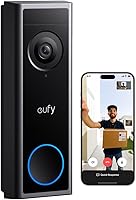
The eufy Video Doorbell C31 offers local microSD storage without a subscription fee. It suits buyers whose main requirement is keeping recordings without an ongoing plan.
It accepts a separately sold microSD card up to 128 GB. HomeBase S380, also sold separately and called HomeBase 3, provides another storage route with expansion up to 16 TB.
Choose the card route if storage at the doorbell meets your needs. Consider the separate base if you want footage stored elsewhere in the home, since footage stored only inside an outdoor device can be harder to recover if that device goes missing.
The C31 has a quick-release rechargeable battery and can also be hardwired. Its phone features include a pop-up video call when someone rings, quick responses, and visitor voice messages.
For continuous recording and 5-second pre-roll, it needs a 16 to 24 V transformer with the existing chime bypassed. Continuous recording works in standalone use or with HomeBase S380, but isn't available with HomeBase S280 or MiniBase.
Skip the hardwired C31 arrangement if preserving your existing wired chime is essential. Plan a supported alternative, such as the separately sold MiniBase Chime or Alexa, while keeping the continuous-recording restrictions in mind.
Keep the battery inserted when hardwiring. Turn off power at the circuit breaker before replacing the battery or installing an SD card.
What should you check before installation?
Check mounting position, Wi-Fi, power, and indoor alerts before securing the doorbell. These choices affect daily use more than choosing solely by video resolution.
Start with the view from the intended mounting position. Aim to capture visitors and the delivery area without letting nearby trim block the camera or giving passing traffic most of the frame.
Check Wi-Fi at the actual doorway, with the door closed. Our guide to whether video doorbells need Wi-Fi explains why a connection that works inside may still need attention at the entrance.
For a wired setup, confirm electrical compatibility before connecting anything. Switch off the circuit and use a qualified electrician if you can't identify the wiring or transformer safely.
Decide who needs to hear the doorbell indoors. Phone notifications may suit one person, while a shared household may need a separate audible alert for people who don't use the app.
Once installed, press the button and confirm that each intended phone or indoor alert responds. For a recording setup, also confirm that you can find and play a saved event rather than stopping after the first notification arrives.
How do you keep a video doorbell useful?
Keep the lens clear, power maintained, and alerts manageable. A doorbell needs occasional attention even when it has no monthly plan.
Wipe the lens gently with a soft cloth and follow the manufacturer's cleaning directions. Water spots, dust, and cobwebs can obscure the view, so check the image after heavy weather or nearby yard work.
Both Blink models have an IP65 weather-resistant design. Still choose the mounting position carefully and avoid directing cleaning spray or a hose at the device.
Review notifications after several normal days at home. Where the app provides controls, adjust them to focus on the doorway rather than accepting frequent alerts you will soon ignore.
For battery use, check the power level routinely and before leaving home for an extended trip. For local storage, periodically confirm that new footage is being saved and copy any clip you need to keep.
Which subscription and storage mistakes should you avoid?
Avoid treating power, alerts, and recordings as one feature. Each needs its own check before you order.
- Assuming wired means continuous recording: Hardwiring describes power, while recording depends on the model and setup.
- Assuming an included module means local storage: Confirm the exact storage function rather than relying on an accessory name.
- Forgetting indoor alerts: A powered camera doesn't automatically provide the chime arrangement your household needs.
- Overlooking separate storage hardware: Include the C31's microSD card or optional base in your setup plan.
- Choosing only by resolution: A clear image doesn't help you review an event unless the footage was saved.
For wider comparisons, see video doorbells with no subscription and whether a Ring doorbell needs a subscription. SunnyStoop's no-subscription category groups related reading, while the best video doorbells for your front door covers broader choices.
Which doorbell should you choose without a subscription?
Choose the Blink Battery Doorbell 2K+ for wire-free press alerts when answering visitors is your main goal. Choose the wired Blink when suitable wiring and avoiding battery changes matter more.
Choose the eufy Video Doorbell C31 for local recording without a subscription fee, allowing for separate storage hardware and its installation requirements. If continuous recording matters, settle the transformer, chime bypass, and supported operating arrangement before ordering.
Make your Blink doorbell subscription decision around the functions you need every day. Use our guide to video doorbells with no subscription to compare alternatives once you've decided whether alerts alone are enough or saved footage is essential.
Frequently asked questions
Can you use a Blink doorbell without a subscription?
Yes, the Blink Battery Doorbell 2K+ supports wire-free installation and doorbell press alerts through the Blink app without a subscription. Both Blink 2K+ models require a compatible subscription for person detection, so choose based on whether you need button alerts, person notifications, or saved video.
Does a Blink doorbell record without a subscription?
Verify recording and storage requirements for your exact Blink 2K+ setup before relying on saved clips without a subscription. The battery system includes a Sync Module Core, but its inclusion alone doesn't establish local recording support; check the supported storage method and any plan requirement before buying.
Is there a video doorbell with local storage and no subscription?
Yes, the eufy Video Doorbell C31 stores footage locally on a separately sold microSD card up to 128 GB without a subscription fee. For continuous recording, it needs suitable hardwired power with the existing chime bypassed, using standalone operation or HomeBase S380 rather than HomeBase S280 or MiniBase.
Is a wired or battery Blink doorbell better without a subscription?
The battery Blink model suits homes that need wire-free installation, while the wired model suits homes with suitable existing doorbell wiring. Both require a compatible subscription for person detection, so changing the power source doesn't remove that requirement or establish which recording options work without a plan.