Ring Wired Doorbell 4K Pro Review: Worth It? (October 2026)
The Ring Wired Doorbell Pro suits homes with suitable wiring and a longer approach where video detail and zoom matter. Choose eufy for built-in local storage, Nest for Google Home, or Ring's battery model when placement flexibility comes first.
On this page (11 sections)
- What does the Ring Wired Doorbell 4K Pro offer?
- Are 4K video and zoom useful at your door?
- How do motion detection and low-light viewing work?
- Does the Ring Wired Doorbell 4K Pro need a subscription?
- How does Ring compare with the wired Nest Doorbell?
- How does Ring compare with eufy Video Doorbell E340?
- Would the Ring Battery Doorbell 4K Pro suit you better?
- What should you check before installing a wired doorbell?
- How should you care for and use the doorbell?
- Which buying mistakes should you avoid?
- Is the Ring Wired Doorbell Pro worth choosing?
The Ring Wired Doorbell Pro is a strong choice for a permanent front-door setup where video detail and a clear view of the approach matter. Choose it if you have suitable wiring and want to avoid routine battery charging.
The main buying decision is whether its camera features solve your doorway's needs. Built-in local storage, a separate package view or freedom to mount away from existing wires may matter more to you.
What does the Ring Wired Doorbell 4K Pro offer?
The Ring Wired Doorbell 4K Pro combines Retinal 4K video and up to 10x Enhanced Zoom with hardwired power. Live View and Two-Way Talk with Audio+ let you see and speak to visitors from your phone.
Ring Wired Doorbell 4K Pro

- Retinal 4K video
- Up to 10x Enhanced Zoom
- 3D Motion Detection
- DIY hardwired installation
A fit for homes with suitable wiring and an approach where extra video detail matters. Video Descriptions require a compatible Ring subscription and are unavailable in Illinois.
Pros
- Retinal 4K video with enhanced zoom
- Hardwired power avoids routine battery charging
- Live View and Two-Way Talk with Audio+
- Low-Light Sight
Cons
- Needs suitable wiring and a compatible installation
- Video Descriptions require a compatible Ring subscription and are unavailable in Illinois
Its strongest use case is a doorway that overlooks more than the person standing at the button. A longer path or larger porch gives you a reason to inspect different parts of the image.
Hardwired power also suits households that don't want a charging task on their calendar. That benefit depends on having a suitable electrical setup at a position that gives the camera a useful view.
The Deep Silver version is one of several finish choices, alongside Polished Night Navy, Polished Sandstone and Polished Mocha. Pick the camera position first, then consider how the finish fits your entry.
Who should choose the Ring Wired Doorbell Pro?
Choose it for a fixed, wired installation where you want to inspect both visitors and activity farther from the door. It makes the most sense when video detail ranks above local storage or flexible mounting.
Skip it if your main goal is seeing packages directly below the camera. The eufy alternative has a separate downward camera designed for that job.
Also skip it if reaching the right mounting spot would require wiring work you don't want. A battery model can make more sense than accepting a poor view just to reuse an old doorbell position.
Are 4K video and zoom useful at your door?
Extra detail helps most along a longer approach, where a person may occupy a smaller part of the image. Zoom can help you inspect that area, but it cannot reveal a package hidden behind a wall or porch post.
Start by naming what you need to see: the visitor's face, the gate, the walkway or the package drop spot. These targets may call for different camera angles.
A doorbell facing across a narrow porch may need better positioning more than higher resolution. A camera aimed toward a bright street may also need an angle that reduces glare.
Don't choose by the zoom number alone. Think about how often you'll need a closer view and whether the camera can see that area without obstacles.
For a broader comparison of fixed-power options, see our guide to best wired video doorbells. If power is still the deciding factor, read wired vs battery video doorbells.
How do motion detection and low-light viewing work?
Motion alerts and nighttime visibility depend on the scene around your door. Ring says its 3D Motion Detection pinpoints movement on your property to deliver more precise alerts with fewer interruptions.
Before setup, decide which activity deserves your attention. Someone approaching the steps matters more than every car passing beyond your property.
Use the motion controls available in the app to focus coverage, then review alerts over several normal days. Adjust gradually so you can tell whether a change reduces distractions without overlooking your approach.
Low-Light Sight keeps color when some ambient light is present and switches to black and white in total darkness. Keep nearby porch lighting clear of objects that cast strong shadows across visitors.
Avoid aiming the camera directly into a porch bulb or placing reflective decorations close to the lens. Check the nighttime view after moving seasonal lights or adding furniture.
Hardwired power does not establish that a doorbell records continuously. Our guide on whether Ring doorbells record all the time explains the recording questions to settle before buying.
Does the Ring Wired Doorbell 4K Pro need a subscription?
Video Descriptions require a compatible Ring subscription, and the feature is unavailable on Ring devices in Illinois. Separate your need for live conversations from your expectations for saved footage and descriptive alerts.
Write down the tasks you expect the doorbell to handle. Answering a visitor, reviewing a delivery later and reading a detailed motion notification are different needs.
Before buying, check Ring's subscription information against that list. Confirm the plan's features and terms instead of assuming that every advertised capability comes with the hardware.
If saving clips without an ongoing subscription is your priority, the eufy alternative deserves closer attention. Our guide to Ring doorbells without a subscription explains how to approach Ring's service choices.
How does Ring compare with the wired Nest Doorbell?
Choose Nest when Google Home is central to your household, rather than switching systems mainly for Ring's camera features. The Google Nest Doorbell Wired (3rd Gen) offers 2K HDR video and a 166° field of view.
Google Nest Doorbell Wired (3rd Gen)
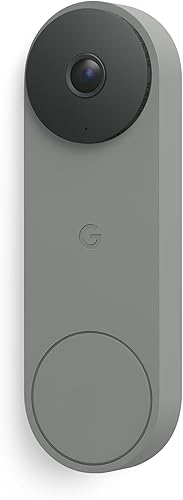
- 2K HDR video
- 166° field of view
- Wired power
- Google Home features
Choose this wired alternative when Google Home is central to your household. Gemini features require a Google Home Premium subscription.
Pros
- 2K HDR video
- 166° field of view
- Wired power
- Encrypted video and two-step verification
Cons
- Gemini features require a Google Home Premium subscription
- Needs a wired installation
A broad view can help cover an entry with activity spread across it. Think about where visitors stand and whether the edges of the image show useful space or mostly walls.
Nest includes encrypted video, two-step verification and account security through your Google Account. Set up those account protections as part of installation, rather than leaving them for later.
Gemini features require a Google Home Premium subscription. More detailed notifications and event summaries require the Advanced subscription, so match the service level to the information you actually want.
Skip Nest if you're choosing chiefly for Ring's higher resolution and zoom. Read our Google Nest Doorbell Wired review if household controls and Google Home features carry more weight.
How does Ring compare with eufy Video Doorbell E340?
Choose the eufy E340 for package visibility and subscription-free local storage. Its dual cameras divide the work between a head-to-toe visitor view and a downward view of the doorstep.
eufy Video Doorbell E340

- Dual cameras
- 2K video
- 8GB local storage
- Wired or battery power
Its downward camera suits doorstep deliveries, while built-in local storage avoids a subscription for saved clips. Battery operation and wired top-up offer different installation paths.
Pros
- Separate views of visitors and doorstep packages
- Built-in 8GB local storage without a subscription
- Wired or battery setup
- Color night vision
Cons
- Supports 2.4 GHz Wi-Fi only
- Does not support Apple HomeKit
The E340 combines 2K video with 8GB of built-in storage. Local capacity is finite, so make a habit of checking saved events and preserving any clip you need to keep.
It can run on a rechargeable battery or connect to a 16–24V source to keep that battery topped up. Treat this as its own power arrangement, rather than assuming it installs exactly like Ring's wired model.
Check your network before choosing it because the E340 supports 2.4 GHz Wi-Fi only. It supports Alexa and Google Assistant, but it does not support Apple HomeKit.
Skip eufy if higher resolution and zoom are your leading requirements. Choose it when deliveries and local recording matter more, and use our eufy Video Doorbell E340 review to explore that fit.
Would the Ring Battery Doorbell 4K Pro suit you better?
Choose the battery model when the best camera position lacks suitable wiring. Its Quick Release Ultra Battery Pack lets you plan around the view you need, with recharging as the trade-off.
Ring Battery Doorbell 4K Pro

- Retinal 4K video
- Up to 10x Enhanced Zoom
- Quick Release Ultra Battery Pack
- 3D Motion Detection
A Ring alternative when the useful camera position has no suitable doorbell wiring. Plan for recharging and a compatible Ring Protect subscription if you want video history and AI-powered alerts.
Pros
- Battery power allows flexible mounting
- Retinal 4K video
- Up to 10x Enhanced Zoom
- Quick Release Ultra Battery Pack
Cons
- Needs recharging
- Video history and AI-powered alerts require a compatible Ring Protect subscription
The Ring Battery Doorbell 4K Pro offers Retinal 4K video and up to 10x Enhanced Zoom. It also includes Live View, Two-Way Talk with Audio+ and radar-powered 3D Motion Detection.
That makes it an alternative for someone who wants Ring's camera features but cannot use the old doorbell location. It still needs a secure mounting surface and a useful network connection.
Plan how you'll reach the battery before mounting it. A spot that requires awkward access turns routine charging into a chore.
A compatible Ring Protect subscription is required for video history and AI-powered alerts. Skip the battery model if suitable wiring is ready and charging is the maintenance task you most want to avoid.
Our Ring Battery Doorbell 4K Pro review explores that choice in more detail.
What should you check before installing a wired doorbell?
Confirm power, chime compatibility and the camera position before starting. An existing doorbell button does not prove that the full electrical setup meets a new camera's requirements.
Check the electrical setup first
Follow the exact model's installation instructions for transformer output, wiring and chime connections. Don't apply the eufy's voltage guidance to Ring or Nest.
Turn off power at the breaker before handling wiring, and confirm that it is off. If you cannot identify the transformer or understand the connections, use a qualified installer.
Our guides explain how to install a video doorbell and what transformer a video doorbell needs.
Check the view and connection
Inspect the proposed mounting spot with the door open and closed. Trim, railings and an open screen door can block the visitor or package area.
Check Wi-Fi at the doorway before drilling. Our guide to whether video doorbells need Wi-Fi explains why wired power and the network connection are separate concerns.
Before finishing, confirm that the doorbell button, indoor alert arrangement and phone notifications work as expected. Open the live view and have someone stand at the normal visitor position.
How should you care for and use the doorbell?
Keep the lens clear and review the view after changes around the entry. Dust, water spots, webs and decorations can reduce useful detail even when the camera itself is working.
Follow the manufacturer's cleaning instructions and use a soft cloth rather than an abrasive pad. Avoid spraying cleaner directly into the device or its openings.
Check the image after storms, yard work or a change in porch lighting. A shifted decoration or growing plant can matter more than a setting in the app.
Review notification permissions on each phone that needs alerts. If several people share door duty, agree on who responds so visitors don't receive conflicting instructions.
Keep the app current and protect the account with available security controls. Revisit access when a household member moves out or no longer needs to view the camera.
Which buying mistakes should you avoid?
Avoid choosing by resolution before checking power, coverage and saved-video needs. Those three decisions determine whether a doorbell fits your home day to day.
- Reusing a poor mounting position: Existing wires save work only if the camera can see the area you need.
- Assuming wired means continuous recording: Confirm recording behavior and service requirements separately from power.
- Overlooking indoor alerts: Decide how someone away from their phone will know the button was pressed.
- Buying for every possible notification: Start with the events you need, then add alerts that serve a clear purpose.
- Ignoring the package drop spot: Ask delivery drivers to use a visible area when practical, without blocking the entry.
If you're still unsure which features deserve priority, compare the best video doorbells for your front door. That broader view helps you decide whether this Ring model solves your main need.
Is the Ring Wired Doorbell Pro worth choosing?
Buy the Ring Wired Doorbell Pro when suitable wiring and a useful camera angle are already achievable. Its detail and zoom make the strongest case at an entry where you want to inspect more than the doorstep.
Choose Nest if Google Home shapes your daily routine, or eufy if package views and built-in local storage lead your list. Pick Ring's battery model when placement freedom is worth the charging task.
Before ordering, settle three things: the mounting spot, the power arrangement and how you'll review events afterward. If another Ring alternative is still on your shortlist, our Ring vs Blink doorbell guide can help with that final choice.
Frequently asked questions
Is the Ring Wired Doorbell 4K Pro really 4K?
Yes, the Ring Wired Doorbell 4K Pro has Retinal 4K video, a wide-angle view and up to 10x Enhanced Zoom. Those features suit buyers who want to inspect activity farther along an approach, but clear sightlines and useful lighting still matter when choosing the mounting position.
Does the Ring Wired Doorbell 4K Pro need a subscription?
Video Descriptions require a compatible Ring subscription and are unavailable on Ring devices in Illinois. Decide whether you need live visitor conversations, saved footage or descriptive notifications, then confirm the current plan requirements for each feature rather than assuming that buying the doorbell includes every service.
Does the Ring Wired Doorbell 4K Pro need a battery?
The Ring Wired Doorbell 4K Pro uses hardwired power, so choose it for a permanent installation with suitable wiring. If your doorway lacks that wiring, compare the Ring Battery Doorbell 4K Pro, which uses a Quick Release Ultra Battery Pack and requires a routine for recharging.
How does the Ring Wired Doorbell 4K Pro compare with eufy Video Doorbell E340?
Choose Ring for higher video resolution and enhanced zoom, or choose the eufy E340 for separate visitor and package views with built-in local storage. The eufy also offers battery operation or wired battery top-up, making it a better fit when avoiding a subscription or changing placement matters most.


