Google Nest Doorbell Review: Worth It? (October 2026)
This Google Nest Doorbell review recommends the Wired 3rd Gen for Google Home households with suitable doorbell wiring. Choose it for battery-free power and 2K HDR video, with a subscription needed for Gemini features.
On this page (8 sections)
- Google Nest Doorbell review: who should buy it?
- What will Nest show at your front door?
- Which Nest features need a subscription?
- How do Ring and Aqara compare with Nest?
- What should you check before installing Nest?
- How should you set up alerts and protect access?
- What upkeep and mistakes should you plan for?
- Google Nest Doorbell review: which one should you choose?
This Google Nest Doorbell review recommends the Wired 3rd Gen for households that already use Google Home and have suitable doorbell wiring. Its strongest fit is a front door where you want a permanent camera without a battery-charging routine.
Buy it because Google Home fits how you manage your house, rather than because Gemini sounds useful in passing. If your priority is distant detail or local recording, the Ring and Aqara alternatives below give you clearer reasons to choose something else.
Google Nest Doorbell review: who should buy it?
Choose the Nest Wired 3rd Gen if Google Home and battery-free power are your priorities. Skip it if you need a battery-powered installation or want Gemini features without an ongoing subscription.
Google Nest Doorbell Wired (3rd Gen)
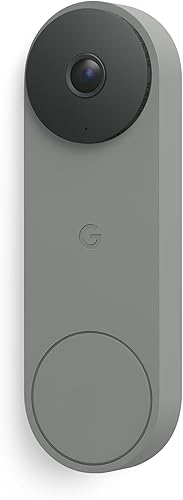
- 2K HDR video
- 166° field of view
- Wired power
- Color night vision
Choose Nest for a Google Home setup and freedom from battery charging. Plan for a subscription if Gemini features are central to your decision.
Pros
- 2K HDR video
- 166° field of view
- No battery to recharge or replace
- Encrypted video and two-step verification
Cons
- Gemini features require Google Home Premium
- Richer event descriptions require an Advanced subscription
- Requires a suitable wired power connection
Nest makes sense when the people who answer the door already use Google's home controls. Keeping that daily task within a familiar setup can matter more than choosing the highest video resolution.
Two-way audio lets you speak with a visitor, which is useful when you need to ask a delivery driver to leave a parcel in a particular spot. Think about who will answer those calls and whether they'll keep their phone close enough to notice them.
This is also a sensible choice for a doorway where removing a camera to charge it would be awkward. Wired power removes that chore, although the installation still needs a compatible electrical setup.
Google Nest Doorbell review for different households
Google Home users with existing wiring are the clearest match. A household starting from scratch should compare installation work and subscription needs before choosing an ecosystem around a single doorbell.
Renters should check permission for drilling and wiring changes first. Anyone who needs a camera at an entry without suitable power should choose a model designed for that location instead.
For a closer look at platform differences, use our Ring vs Nest Doorbell comparison. Choose around the features you'll use each week, including who receives alerts and how you want to review events.
What will Nest show at your front door?
Nest offers 2K HDR video and a 166° field of view, with night vision for viewing after dark. Those features help you see the entry, but the camera's position determines whether the useful parts of that entry are visible.
A wide view can include more of an approach while also bringing a neighboring doorway or busy sidewalk into frame. Before mounting, decide whether your priority is a visitor's face, the path toward the door or the place where deliveries usually land.
Don't assume a wide angle guarantees a view directly below the camera. Door trim, steps, a recessed entrance and the camera's height can all change what appears on screen.
The body measures 5.16 × 1.65 × 1.14 inches. Measure the flat mounting surface, leaving room to access the fasteners rather than checking only whether the camera fits between the trim and door.
Google includes a base plate, wedge, spacers, mounting hardware, wire connector and chime connector. A wedge can help change the direction of the view, but it cannot solve every obstruction or unsuitable mounting surface.
For night use, inspect the scene with your porch lighting on and off. Nearby reflective surfaces and lights aimed toward a camera can affect what you see, so adjust the placement before committing to permanent holes.
Which Nest features need a subscription?
Gemini features require Google Home Premium, while richer event descriptions and summaries require its Advanced subscription. Treat the plan as part of the buying decision if those tools are the reason you want Nest.
Google describes features that summarize events and let you search video history by asking for something. These can suit someone who wants to find a particular arrival without working through events one by one.
Separate three needs before choosing a plan: seeing who's at the door now, receiving useful alerts and finding an event later. A feature that helps with one task doesn't automatically provide the recording history you need for another.
For example, a detailed notification may help you decide whether to open the app immediately. Finding a delivery from an earlier day depends on the recording and retention terms of your chosen service.
Check Google's Nest support for current plan features, recording options and availability. Don't assume that a camera feature mentioned in an advertisement is included with every subscription tier.
If you mainly want footage without an ongoing plan, compare video doorbells with no subscription. Choose storage around how you'll retrieve an important clip, not just how an alert appears on your phone.
How do Ring and Aqara compare with Nest?
Ring suits buyers focused on video detail, while Aqara suits buyers focused on local storage and platform choice. Nest remains the more direct fit when Google Home is the main reason for buying.
Ring Wired Doorbell 4K Pro: for a longer approach
Choose the 4K Pro if you want to examine activity farther along the approach to your door. Its 3D Motion Detection is another reason to consider it when sorting useful arrivals from nearby movement matters.
Ring says that detection system provides more precise alerts with fewer interruptions. Camera position and detection settings still deserve attention, especially where your property borders a public walkway.
Skip this model if you don't have a clear use for its added video detail or zoom. A camera aimed at a short, enclosed porch may not need the same priorities as one overlooking a longer front path.
Live View and Two-Way Talk with Audio+ support real-time conversations. Video Descriptions require a compatible Ring subscription and are unavailable in Illinois.
Ring Wired Doorbell 2K Plus: for routine doorstep alerts
Choose the 2K Plus if you want a hardwired Ring doorbell for everyday arrivals and motion notifications. It suits buyers who don't need the 4K Pro's emphasis on distant detail.
Low-Light Sight provides color video with some ambient light and switches to black-and-white in total darkness. Video quality can vary with internet bandwidth and device temperature.
Its Video Descriptions carry the same subscription requirement and Illinois restriction noted above. Skip it if those descriptions are your deciding feature and you cannot use them where you live.
Aqara G410: for local storage and mixed platforms
Choose Aqara if you want recordings stored on a card inside the home. Keeping the card in the indoor chime also separates that storage from the camera mounted outside.
The G410 supports Apple HomeKit Secure Video, Matter, Alexa, Google Assistant, SmartThings and Home Assistant. Its built-in Zigbee and Matter hub can also help buyers who want to connect other smart devices.
HomeKit use limits video to 1600 × 1200, including Aqara Home when both platforms run together. Choose it for the platform and storage arrangement only if that resolution trade-off fits your needs.
The included chime replaces a traditional chime connection rather than working with your existing traditional chime. Keep it within 5 meters of the doorbell where possible, avoiding thick concrete or metal barriers between them.
Skip Aqara if you cannot place its chime close enough or want all its extras available through another platform. Custom audio, the voice changer and privacy masking are available through Aqara Home.
What should you check before installing Nest?
Confirm power compatibility, chime compatibility and the mounting location before removing your old doorbell. Existing wires are a starting point, not proof that the setup meets Google's requirements.
Find the transformer and identify the existing chime arrangement. Follow Google's model-specific instructions for the required power supply and connector installation rather than borrowing voltage requirements from another brand.
Our guide to what transformer a video doorbell needs explains the checks involved. Use it to understand the terms, then confirm the requirements for this exact Nest model.
Check Wi-Fi at the actual mounting spot with the door closed. A connection that works well inside a hallway may behave differently outside a thick wall or metal door.
For more help identifying connection problems, read whether video doorbells need WiFi. Solve a weak connection before relying on the camera for timely visitor alerts.
Turn off the relevant power before handling doorbell wiring. If you cannot identify the circuit or safely confirm the setup, use a qualified installer.
Read how to install a video doorbell for the general sequence. The wired doorbell guide is another reference for choosing a powered setup.
Once connected, inspect the live view before tightening everything into its final position. Check the route a visitor takes, the doorstep and any nearby doorway that should stay outside the frame.
How should you set up alerts and protect access?
Start with useful notifications and secure account access, then adjust alerts around your doorway. A camera that sends constant distractions is easier to ignore when a visitor actually needs you.
Make sure the people responsible for answering the door can receive the alerts they need. Check their phone notification permissions and avoid giving broader account access than necessary.
Nest includes encrypted video and two-step verification through your Google Account. Enable two-step verification and protect the account's recovery options, since account access is part of protecting camera access.
A green LED indicates when the doorbell is processing or streaming video. It provides a visible activity signal, but it doesn't replace checking that your alerts and chosen recording options work as intended.
Walk toward the door from the routes visitors normally use and check the resulting notifications. Adjust the controls available in the app if routine sidewalk activity overwhelms genuine doorstep arrivals.
Also check whether everyone indoors can notice a visitor when their phones are silenced. Don't assume that fitting a video doorbell automatically solves the household's indoor notification needs.
What upkeep and mistakes should you plan for?
Keep the lens clear and review the view after changes around the door. Wired power removes battery charging, but the camera still needs basic care.
Follow Google's cleaning instructions and use a soft cloth suitable for the lens. Dust, water spots and spiderwebs can obscure the picture, especially when light catches them after dark.
Keep shrubs and decorations from blocking the approach. Recheck the image after adding seasonal lights, hanging a wreath or moving a tall planter near the camera.
Keep the app and device software current, and investigate repeated disconnections rather than accepting them as normal. Check power and network conditions before changing several settings at once.
Avoid buying mainly for a resolution number. A well-placed camera with a useful view serves a doorstep better than a higher-resolution camera aimed at a wall or past the visitor.
Don't confuse motion alerts with a complete recording record. Before depending on footage for a delivery dispute, confirm how your chosen service records, retains and lets you retrieve events.
Finally, don't choose a subscription around features you rarely expect to use. Write down your main task, such as answering visitors or finding earlier deliveries, and pay for the service that supports it.
Google Nest Doorbell review: which one should you choose?
Choose Nest for a Google Home household with compatible wiring and a clear reason to use its connected features. Confirm the installation and subscription requirements before committing, especially if Gemini tools drive the decision.
Choose Ring Wired Doorbell 4K Pro for a longer approach where zoom and added video detail matter. Choose Ring Wired Doorbell 2K Plus for routine Ring alerts, or Aqara G410 for indoor card storage and broader platform choice.
The final step is to match the camera to your doorway: measure the mount, check power and Wi-Fi, and decide how you'll retrieve footage. Compare the best wired video doorbells if any of those checks point away from Nest.
Frequently asked questions
Does the Google Nest Doorbell Wired 3rd Gen need a subscription?
Gemini features require Google Home Premium, and richer event descriptions and summaries require its Advanced subscription. If those tools are your main reason for choosing Nest, check Google's plan terms and recording options before buying so you can judge the ongoing commitment alongside the camera.
Does the Google Nest Doorbell Wired 3rd Gen need batteries?
No, this Nest model uses corded electric power, so it has no battery to recharge or replace. You need suitable doorbell wiring at the mounting location, and an existing doorbell does not by itself confirm compatibility, so check Google's power and chime requirements before installation.
How wide is the Google Nest Doorbell's view?
The Google Nest Doorbell Wired 3rd Gen has a 166° field of view, but the mounting angle determines which parts of your entry appear on screen. Check the visitor approach, doorstep and nearby walls before securing it, rather than assuming a wide view guarantees coverage of every package location.
How does the Nest Doorbell compare with the Ring Wired Doorbell 4K Pro?
Nest suits buyers who prioritize Google Home, while Ring Wired Doorbell 4K Pro suits those who prioritize 4K video, up to 10x Enhanced Zoom and 3D Motion Detection. Their description features have separate subscription requirements, and Ring's Video Descriptions are unavailable in Illinois, so compare feature access before choosing.