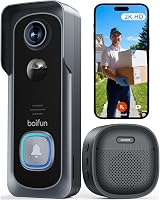
eufy Video Doorbell E340 Review: Worth It? (October 2026)
The eufy Video Doorbell E340 suits homes that want separate visitor and package views with subscription-free local recording. Choose it if your doorway has suitable Wi-Fi and you prefer flexible power options; choose an alternative if Apple HomeKit is essential.
On this page (10 sections)
- The eufy Video Doorbell E340 at a glance
- Will the dual cameras cover your delivery spot?
- What matters more than the 2K label?
- Does local storage remove the need for a plan?
- Should you use battery power or doorbell wiring?
- Will your Wi-Fi and indoor chime work?
- Which alternative should you choose instead?
- What should you do after installing the E340?
- Which buying mistakes should you avoid?
- Should you buy the eufy Video Doorbell E340?
The eufy Video Doorbell E340 is a good choice for frequent deliveries and local recording without a subscription. Its main advantage is a separate downward camera that shows packages below the visitor view.
Buy it for that doorstep coverage, rather than for resolution alone. Your mounting position, power supply and home network will determine whether it fits your entrance.
For a wider starting point, see SunnyStoop’s guide to the best video doorbells for your front door.
The eufy Video Doorbell E340 at a glance
The E340 suits households that want a clear view of visitors and the delivery spot without adding a recurring storage plan. It offers flexible installation, but network and smart-home compatibility are firm buying limits.
eufy Video Doorbell E340

- Dual cameras
- 2K video
- 8GB built-in local storage
- Battery or wired power
Choose the E340 for a doorstep where packages sit below the main visitor view. Built-in local recording avoids a separate memory card and a recurring storage plan.
Pros
- Separate visitor and package views
- Local recording without a subscription
- Rechargeable battery or wired power
- Alexa and Google Assistant support
Cons
- No 5 GHz Wi-Fi support
- No Apple HomeKit support
- Pre-record configuration requires bypassing the existing chime
The second camera matters most when parcels usually land against the wall or just below your doorbell. A wider forward-facing view doesn't automatically cover that same patch of ground.
Who should buy the eufy Video Doorbell E340?
Choose the E340 if deliveries arrive often and you want to check the doorstep before opening the door. It's also a sensible option when you want to start with battery power and leave a wired installation for later.
Skip it if Apple HomeKit is central to your home or your intended connection must use 5 GHz Wi-Fi. Those needs point toward a different doorbell, regardless of how useful the package camera looks.
If you're choosing a system for several devices, the eufy vs Ring doorbell comparison helps you weigh the wider ecosystem.
Will the dual cameras cover your delivery spot?
The dual cameras help when visitors and parcels occupy different parts of the frame. The front camera covers visitors head to toe, while the downward camera covers items near the threshold.
Before choosing a mounting spot, place a box where deliveries usually land. Check whether a step, railing, deep door recess or open storm door could block the view.
A camera can't see around a corner or through a parcel stacked in front of another one. If couriers use several drop-off spots, decide which area matters most rather than expecting one mount to cover everything.
The included 15-degree mount adapter gives you an angle option. Check both camera views before securing the bracket, since improving the visitor view could move the delivery area toward the edge.
Motion, human and package alerts serve different needs. Start with the events you actually want to hear about, then adjust your notification choices after observing normal foot traffic.
What matters more than the 2K label?
The E340’s 2K video is useful for checking visitors, but framing and light deserve equal attention. A face near the center of a well-positioned camera is more useful than a sharp image of an empty walkway.
Avoid aiming mostly at a bright street while leaving the visitor standing in a dark recess. Check the view at the time deliveries usually arrive, since the sun can change the balance between the porch and background.
Eufy claims its color night vision provides a clear viewing distance of up to 16 ft. Treat that as a planning reference for the entry area, rather than a promise of detail across your yard.
Two-way talk lets you speak to visitors, while Quick Replies provide preset responses when you're occupied. Choose a reply that gives a delivery instruction without sharing private details about your schedule.
A doorbell view can help you decide whether to answer the door. It should also let you tell where a parcel was placed, which is the more relevant goal for this model.
Does local storage remove the need for a plan?
Yes, the E340 provides 8GB of built-in local storage without a subscription for local recording. You don't need to buy a memory card to use that storage.
Capacity alone doesn't tell you how many days of footage you'll keep. Event volume and recording settings affect storage use, so avoid choosing it on an assumed retention period.
Make clip review part of your routine after an unusual delivery or unwanted visit. Learn the available save and export steps early, and keep a separate copy of footage you need to retain.
Built-in storage also puts the recording location at the doorbell. If you prefer footage stored inside your home, that should influence your comparison.
Our guide to video doorbells with local storage explains that choice. The best video doorbells with no subscription guide covers other ways to avoid a recurring recording plan.
Should you use battery power or doorbell wiring?
Choose battery power for placement flexibility and compatible wiring to reduce charging chores. Neither choice removes the need to check the camera angle and wireless signal.
The E340 uses a quick-release rechargeable battery. Pick a mounting position you can reach safely, since a convenient camera view can become inconvenient when it's time to charge.
For wired use, it accepts a 16–24V power source that keeps the battery topped up. Confirm the transformer and installation requirements rather than assuming the wires behind an old doorbell are suitable.
Pre-recording has a separate requirement: eufy specifies constant power from a 16–24V, 30VA transformer and bypassing the existing chime. Confirm the current setup instructions before planning around that feature.
An existing mechanical chime can work in a supported configuration, but the pre-record arrangement changes that plan. Decide which matters more before connecting the doorbell.
Turn off power before handling doorbell wiring. Use a qualified installer if you can't identify the circuit or confirm the supply.
Start with our video doorbell installation guide for the full planning sequence. For alternatives, compare wired doorbells and the best battery video doorbells.
Will your Wi-Fi and indoor chime work?
The E340 requires 2.4 GHz Wi-Fi and supports Alexa and Google Assistant. It doesn't support Apple HomeKit, so settle those compatibility questions before ordering.
A router can offer both wireless bands under one network name. Confirm that a compatible device can join the required band, and follow the doorbell’s pairing instructions if setup needs a network change.
Check coverage at the actual mounting spot with the door closed. A phone signal check is a useful first step, but confirming the doorbell’s connection before final mounting is more useful.
Compatible indoor options include HomeBase 2 (S280), HomeBase 3 (S380), MiniBase Chime T8023/T8024 and supported Alexa or Google Voice Assistant devices. The original eufy Wi-Fi Chime T8020 and eufy Chime T8740/T8742 aren't compatible.
Don't assume every accessory with the same brand name will pair. Check the model number on an existing chime, especially if someone else installed it.
If household members don't always carry a phone, plan an indoor alert they can hear. Our guide to video doorbells with a chime helps you decide what belongs in that setup.
Which alternative should you choose instead?
Choose an alternative when wired recording, Ring integration or Apple Home support matters more than the E340’s package camera. Each model below solves a different buying problem.
Ring Wired Doorbell 2K Plus: for an existing Ring setup
The Ring Wired Doorbell 2K Plus suits buyers who already want Ring and have a suitable hardwired location. Its Retinal 2K video and motion alerts cover the core job of seeing activity at the door.
Ring’s Low-Light Sight uses ambient light for color video and switches to black-and-white in total darkness. Video quality can vary with internet bandwidth and device temperature.
Video Descriptions require a compatible Ring subscription and aren't available in Illinois. Skip this model if you need battery placement or that specific feature without a recurring plan.
For a separate Ring model comparison, see our Ring Wired Doorbell 4K Pro review.
Reolink Video Doorbell WiFi 2K: for wired recording
Choose Reolink if you want 24/7 recording and pre-recording support at a wired entrance. Plan the storage setup alongside the doorbell, since recording support and a complete recording system are separate decisions.
Its 4:3, 180-degree view favors broad entrance coverage, and it connects to either Wi-Fi band. An included plug-in chime provides indoor alerts without relying only on a phone.
Power requirements are 12–24VAC at 50/60Hz or DC 24V. Existing doorbell wiring supplies power only, so don't choose it on the assumption that your traditional chime will carry over.
Skip Reolink if suitable wiring isn't available and you want a simple battery installation. Its adjustable motion zones and privacy masks are useful if the view includes a busy walkway or neighboring space.
Aqara Doorbell Camera G410: for Apple Home households
Choose Aqara if HomeKit Secure Video support is a requirement. It also includes a Zigbee and Matter hub for connecting other smart-home devices.
The indoor chime holds a microSD card up to 512GB, sold separately. This places local storage inside, but the doorbell must stay within useful signal range of that chime.
Aqara recommends keeping them within 5 meters where possible, with 10 meters as the maximum. Thick concrete and metal doors can interfere, so check outlet placement before choosing it.
HomeKit limits video to 1600×1200, including in Aqara Home when both platforms are used together. Skip it if you need your existing traditional chime, since the G410 uses its included chime.
For battery use, Aqara specifies alkaline 1.5V LR6 cells and advises against rechargeable 1.2V Ni-MH batteries. Don't treat every doorbell’s battery routine as interchangeable.
What should you do after installing the E340?
Start by confirming coverage, alerts and clip retrieval before relying on the doorbell. A completed pairing screen doesn't tell you whether your entrance is framed well.
Walk the normal visitor route and place a parcel at the usual drop-off spot. Review the resulting views, then check the same area after dark.
Make sure the people who answer the door can hear or receive an alert. Open live view, try two-way talk and confirm that a saved event can be found again.
Keep both camera windows clean with a soft cloth, following the care instructions. Dust, water spots and spiderwebs near the lens can obscure the area you're trying to watch.
Review notifications after normal household traffic has passed the door. Too many unwanted alerts make useful ones easier to ignore, while overly restrictive choices can leave out activity you care about.
Check charging needs during your normal use rather than assuming a fixed battery interval. Also review account access and available firmware updates as part of routine upkeep.
Which buying mistakes should you avoid?
Avoid choosing by resolution alone or reusing accessories without checking compatibility. The more costly mistake is buying a doorbell that doesn't fit the entrance, power supply or household routine.
Don't mount it permanently before checking both camera views. A small change in position may matter more than another video feature.
Don't confuse wired power with a particular recording mode or chime arrangement. On the E340, the pre-record configuration needs its own installation plan.
Don't assume local recording means unlimited history. Save important clips promptly and decide where you want a lasting copy to live.
Don't choose a battery model for a spot you can't safely reach. If flexible placement is your main need, compare the options in our battery doorbell guide before committing to a location.
Should you buy the eufy Video Doorbell E340?
Buy the eufy Video Doorbell E340 when frequent deliveries make the downward camera useful and you want straightforward local recording. Confirm the network, mounting view and indoor alert arrangement first.
Choose Ring for a wired Ring setup, Reolink for a planned continuous-recording system, or Aqara when Apple Home is essential. Those are stronger reasons to switch than small differences in resolution.
Before ordering, work through how to choose a video doorbell with your doorway, power source and recording needs in mind.
Frequently asked questions
Does the eufy Video Doorbell E340 need a subscription?
No, the eufy Video Doorbell E340 records to 8GB of built-in local storage without a subscription or monthly storage fee. You don't need a separate memory card for that feature, but you should decide which clips to retain and learn how to save important footage before you need it.
Can the eufy E340 run on battery or wired power?
Yes, the E340 uses a rechargeable battery or a compatible 16–24V power source that keeps the battery topped up. For pre-recording, eufy specifies constant power from a 16–24V, 30VA transformer and bypassing the existing chime, so confirm that configuration in the installation instructions before wiring.
Does the eufy Video Doorbell E340 work with Apple HomeKit?
No, the E340 supports Alexa and Google Assistant but does not support Apple HomeKit. Choose a compatible alternative such as the Aqara Doorbell Camera G410 if you want doorbell recordings and notifications through Apple Home, and account for its lower video resolution when connected to HomeKit.
What Wi-Fi does the eufy E340 support?
The E340 connects to 2.4 GHz Wi-Fi and does not support a 5 GHz connection. Confirm that your router provides the required band, then check coverage with the door closed at the actual mounting spot because a strong signal inside the house may not reach through the entry wall.