5 Best Video Doorbells for Seniors (October 2026)
The best video doorbells for seniors include the Ring Battery Doorbell 2K for homes without wiring, the Ring Wired Doorbell 2K for avoiding charging chores, and the Blink Wired Doorbell 2K+ for Alexa households.
On this page (14 sections)
- How we chose the best video doorbells for seniors
- Ring Battery Doorbell 2K: For homes without suitable wiring
- Ring Wired Doorbell 2K: For fewer power chores
- Blink Wired Doorbell 2K+: For households using Alexa alerts
- Arlo Video Doorbell 2K (2nd Gen): For flexible installation plans
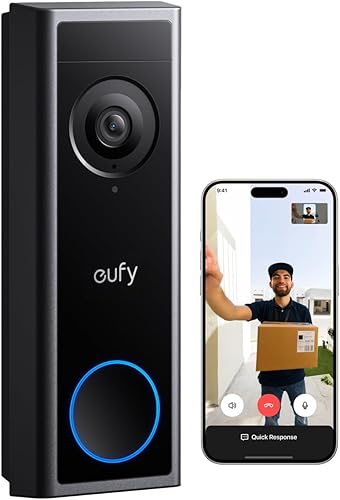
- eufy Video Doorbell C31: For local recording without storage fees
- Which power setup will be easiest next month?
- How will you hear and answer a visitor?
- Should you pay for saved video or use live viewing?
- What should you arrange before mounting the doorbell?
- How can family help without making daily use harder?
- Which habits keep a video doorbell useful?
- What mistakes should seniors avoid when buying?
- Which video doorbell is best for seniors in your home?
The Ring Battery Doorbell 2K is the best video doorbell for most seniors who want phone alerts and visitor conversations without connecting to home wiring. If removing a doorbell for charging would be difficult, choose Ring Wired Doorbell 2K and arrange a suitable wired installation instead.
The best choice depends on your daily routine, rather than your age. Start with how you want to hear visitors, answer them and keep the doorbell powered.
A clear image helps, but it cannot make up for an alert you miss or a battery nobody can recharge. Choose the setup you can use comfortably when a visitor arrives unexpectedly.
For a broader comparison, see our guide to the best video doorbells for your front door. If wiring is already ruled out, start with our best battery video doorbells guide.
Our picks at a glance
-
1

-
2

-
3

- 4
 Check it
Arlo Video Doorbell 2K (2nd Gen)
Best for changing installation plans - 5
 Best for avoiding storage feesCheck it
How we chose the best video doorbells for seniors
We compared power upkeep, visitor communication, indoor alerts and recording choices. These details determine how much work a doorbell adds after installation.
A senior who uses a phone throughout the day may prefer direct phone alerts. Someone who leaves it charging in another room may need a compatible indoor chime or smart speaker.
We also considered what happens after setup: removing a battery unit, choosing a subscription, managing stored clips and adjusting alerts. Extra features help only when they solve a task you want the doorbell to handle.
The order below favors a straightforward fit for common needs, with alternatives for different households. Someone who wants no charging chores should move directly to our best wired video doorbells.
If you're unsure which power source suits your home, our wired vs battery video doorbells guide explains that decision in more detail.
| Product | Best for | Our score |
|---|---|---|
| Ring Battery Doorbell 2K | homes without wiring | 8.8 |
| Ring Wired Doorbell 2K | avoiding charging chores | 8.5 |
| Blink Wired Doorbell 2K+ | Alexa households | 7.9 |
| Arlo Video Doorbell 2K (2nd Gen) | changing installation plans | 7.7 |
| eufy Video Doorbell C31 | avoiding storage fees | 7.0 |
Ring Battery Doorbell 2K: For homes without suitable wiring
Choose Ring Battery Doorbell 2K when avoiding wiring matters most and someone can handle recharging. Its main trade-off is the need to take the doorbell off its mount for power.
Ring Battery Doorbell 2K
- Retinal 2K video
- Up to 6x Enhanced Zoom
- Two-Way Talk
- Built-in rechargeable battery
- Real-time motion notifications
A good fit when connecting to home wiring is impractical and someone can handle recharging. Phone alerts and visitor conversations let you check the door from inside.
Pros
- Built-in battery recharges by USB-C
- Live View and Two-Way Talk
- Supports notifications through compatible Echo devices
Cons
- Doorbell must be removed for charging; USB-C cable not included
- Video history and AI-powered alerts require a compatible Ring Protect subscription
Why this video doorbell suits seniors
Live View and Two-Way Talk let you check a visitor and speak from your phone. Motion notifications also alert you to activity when nobody presses the button.
Its Retinal 2K camera includes up to 6x Enhanced Zoom, useful for enlarging part of the view. Enlarging an image does not replace good placement, so make sure visitors' faces sit clearly within the frame.
The included removal tool releases the doorbell for USB-C charging. A charging cable is not included, so have one ready and keep the tool somewhere easy to find.
Choose this model if you want to avoid electrical work and have a reliable charging helper, or can safely manage the task yourself. It also supports custom notifications through compatible Echo devices and video through Echo Show.
Skip it if reaching or releasing the doorbell would be difficult and nobody can help regularly. The wired Ring below removes that particular chore.
Saved video and AI-powered alerts require a compatible Ring Protect plan. Decide whether you want to answer current visitors or also look back at events you missed.
Ring Wired Doorbell 2K: For fewer power chores
Choose Ring Wired Doorbell 2K when suitable wiring is available and recharging would be an unwelcome task. A properly planned installation trades more work upfront for less routine power care.
Ring Wired Doorbell 2K
- Retinal 2K video
- Up to 6x Enhanced Zoom
- Two-Way Talk
- Connects to home electricity
- Real-time motion notifications
Choose this model when suitable wiring is available and battery care would be a burden. It keeps the Ring live-view and talk features while removing routine recharging.
Pros
- Continuous power from home wiring
- Live View and Two-Way Talk
- Works with select Alexa-enabled devices
Cons
- Requires a suitable wired setup
- Video history and AI-powered alerts require a compatible Ring Protect subscription
This model connects to home electricity and provides phone motion alerts, Live View and Two-Way Talk. Its Retinal 2K camera also offers up to 6x Enhanced Zoom.
The main reason to choose it over the battery Ring is ongoing convenience. You don't need a reminder to remove the doorbell, find a cable and put the unit back.
Ask an installer to confirm wiring compatibility before buying. Existing doorbell wires alone do not establish that the electrical setup meets this model's needs.
Plan indoor notifications at the same time, including any compatible Echo device you want to use. Don't assume a familiar old chime will work unchanged just because the camera uses wires.
Skip this model if you cannot arrange suitable wiring or lack permission to alter the entryway. It also depends on home electricity, so wired power should not be confused with backup power.
As with the battery Ring, video history and AI-powered alerts need a compatible Ring Protect subscription. Our guide to using a Ring doorbell without a subscription helps separate live use from paid extras.
For the mounting and setup process, read how to install a video doorbell.
Blink Wired Doorbell 2K+: For households using Alexa alerts
Choose Blink Wired Doorbell 2K+ if you have suitable wiring and want indoor alerts through Alexa or Blink Chime. Decide where those alerts will sound before installing the camera.
Blink Wired Doorbell 2K+
- Hardwired power
- Head-to-Toe 2K View
- Two-way audio with noise cancellation
- Person detection alerts require a subscription
- Blink Chime or Alexa required for in-home alerts
Suits a wired home where Alexa or a separate Blink Chime will announce visitors indoors. The head-to-toe view helps you check people and deliveries near the door.
Pros
- Hardwired power
- Head-to-Toe 2K View
- Two-way audio with noise cancellation
Cons
- In-home alerts require Alexa or a separately sold Blink Chime
- Person detection alerts require a compatible Blink subscription
Blink requires Alexa or a separately sold Blink Chime for in-home alerts. That requirement matters if you usually leave your phone in another room.
Its Head-to-Toe 2K View helps you check both visitors and deliveries near the threshold. Two-way audio includes noise cancellation, which is useful to consider when porch conversations are a priority.
A hardwired connection supplies power without a battery charging routine. The doorbell also has an IP65 weather-resistant design and night vision that changes to black and white in near darkness.
Person detection alerts require a compatible Blink subscription. Those alerts may be useful if you want notices tied to people, but include the plan in your decision rather than assuming the feature comes without an ongoing fee.
Skip Blink if you expect the doorbell alone to provide an indoor announcement. It is a better match when the required alert device already fits your household routine.
Place that device where you spend time, then check audibility with doors closed and everyday background sound present. A chime beside the front door may be less useful than one you can hear from your usual chair.
Arlo Video Doorbell 2K (2nd Gen): For flexible installation plans
Choose Arlo if you want rechargeable battery power or wired trickle charging without committing to a wired-only doorbell. Basic alerts and live streaming work without a subscription.
Arlo Video Doorbell 2K (2nd Gen)
- 2K video
- Battery or wired installation
- Advanced detection requires a paid plan after trial
- Two-way audio and quick replies
- Basic alerts and live streaming work without a subscription
A flexible choice if you want battery installation now and may use wired trickle charging later. Basic alerts and live streaming remain available without a subscription.
Pros
- Rechargeable battery or wired trickle charging
- Activity zones and privacy zones
- Basic alerts and live streaming without a subscription
Cons
- Video history and advanced detection require a paid plan after trial
- Extra alert and routine choices need careful setup
That flexibility suits a household that wants to mount the doorbell now and consider wiring later. You still need to plan battery care when using it without a wired connection.
Arlo combines 2K video with a head-to-toe view, two-way audio, quick replies and phone video calls. Quick replies give you another way to respond when speaking aloud is inconvenient.
Activity zones let you focus on relevant areas, while privacy zones block sensitive spaces. These controls deserve attention at a shared entrance or near a neighbor's doorway.
A paid Arlo Secure plan is required after the trial for advanced features, including video history and AI detection. Its detection choices cover people, vehicles, packages and pets.
The doorbell also supports Alexa, Apple Home, Google Home, Samsung SmartThings and IFTTT. Choose the connection you actually need rather than building several routines at once.
Skip Arlo if you want every available alert feature without a recurring plan. It also needs a clear settings plan if several household members have different ideas about which activity deserves a notification.
eufy Video Doorbell C31: For local recording without storage fees
Choose eufy Video Doorbell C31 if saving video locally matters more than having the simplest wired setup. It supports a separately sold microSD card up to 128 GB without a storage subscription.
eufy Video Doorbell C31
- 2K FHD video
- Battery or wired power
- Local microSD storage up to 128 GB
- No subscription fee for local storage
- Hardwiring requires bypassing the existing chime
Fits buyers who want to save footage locally and avoid a storage subscription. Plan for a separate memory card and, if hardwiring, a supported indoor alert after bypassing the existing chime.
Pros
- Local storage without a subscription fee
- Quick-release rechargeable battery
- Phone video calls, quick responses and visitor voice messages
Cons
- microSD card is sold separately
- Hardwiring requires a chime bypass and the battery to remain inserted
When someone rings, a video call appears on your phone. Quick responses and visitor voice messages provide other ways to handle a delivery or missed visit.
The C31 offers a quick-release rechargeable battery and a wired option. Hardwiring requires the battery to stay inserted and the existing chime to be bypassed, so plan a supported replacement indoor alert.
Its continuous recording and 5-second pre-roll require a suitable 16 to 24 V wired setup. Continuous recording needs standalone use or HomeBase S380 rather than HomeBase S280 or MiniBase.
Those conditions matter if you're buying mainly to review a longer stretch of activity. Don't choose battery installation expecting the same recording functions as a correctly configured wired setup.
Skip the C31 if you want to preserve your current chime unchanged while hardwiring. It's a better match for someone willing to arrange the storage card, power connection and indoor alert together.
Follow eufy's instruction to turn off power at the circuit breaker before replacing the battery or installing an SD card. For alternatives focused on saving footage at home, compare video doorbells with local storage.
Which power setup will be easiest next month?
Choose the power source you can maintain after installation, not just the one that looks easiest to mount today. Battery power avoids electrical connections, while wired-only models avoid routine recharging.
Picture a normal charging day before choosing a battery model. Someone must notice the need, safely reach the mount, recharge the battery or unit, and restore it to service.
If that chain depends on a helper who visits rarely, suitable wiring may be the more practical choice. A wired installation can also suit someone who prefers fewer reminders and small maintenance jobs.
Wiring brings its own requirements: permission, a compatible supply and safe installation. Have a qualified installer handle unfamiliar wiring rather than guessing from the old doorbell's appearance.
Arlo's wired option uses trickle charging, while the C31 has specific battery and chime requirements when hardwired. Follow the instructions for the exact model rather than treating every wired connection the same way.
Home electricity is also different from recording. A powered doorbell does not automatically mean continuous video is being saved, and a wired connection does not provide protection from a household power outage.
How will you hear and answer a visitor?
Choose an indoor alert you can notice from your usual rooms, then choose how you want to answer. Hearing the bell and opening a video feed are separate tasks.
A phone notification may work well if your phone stays nearby and you already use app alerts comfortably. If it spends much of the day on a bedroom charger, plan another supported way to hear visitors.
Consider where you sit, whether interior doors stay shut and how much background sound is common. Check an alert from the kitchen and bedroom as well as beside the front door.
A compatible smart speaker can announce activity, but a speaker without a screen will not show a visitor's face. Decide whether sound alone is enough or whether you want a nearby screen for viewing.
For phone use, practice opening the alert, finding the talk control and ending the conversation. Check speaker volume and text size on the device you'll actually use.
If small controls are difficult, explore your phone's display and accessibility settings before settling on an answering routine. A family member's larger phone does not show how comfortable the process will feel on yours.
Our guide to video doorbells and indoor chimes explains why the sound inside the home deserves its own setup plan.
Should you pay for saved video or use live viewing?
Choose saved video if reviewing missed activity matters; choose live viewing if your main goal is answering visitors. They solve different problems, so decide which one you need before comparing plans.
Live viewing helps when someone is at the door now. Saved clips help when you return to your phone later and want to see what happened.
Make a short list of events you'd want to review, such as a missed delivery or someone approaching while you're away. If that list is empty, extra recording features may add little to your routine.
For a subscription, check the ongoing terms and which features stop if you cancel. If a trial is included, write down its end date and decide who will handle the account.
Local storage avoids a storage subscription on the C31, but it still needs management. Learn how to find, play and save a useful clip before you need one urgently.
Agree on who can view footage and where exported clips will be kept. Recording more is not a substitute for knowing how to find the event you care about.
What should you arrange before mounting the doorbell?
Check connection, placement and permission before drilling. These steps prevent a suitable doorbell from becoming awkward to use at your particular entrance.
Start with WiFi at the intended mounting spot, with the front door closed. A strong connection elsewhere in the home does not establish that the porch has the coverage it needs.
Our guide to whether video doorbells need WiFi explains the connection side. Settle that question before blaming slow video on the camera.
Follow the manufacturer's mounting guidance and check the actual view before fixing the final position. Look for a visitor's face, the approach to the door and the place deliveries usually land.
Watch for walls, rails or door trim blocking part of the frame. Also consider glare and bright backgrounds, which can make a visitor harder to see even when the camera has a clear view outward.
Check audio from the normal visitor standing spot. Speak at an everyday volume and make sure both people understand how the conversation starts.
For shared entrances, confirm that you may mount the device and consider neighbors' privacy. Our guide to doorbell cameras for apartments covers placement and installation concerns for renters.
How can family help without making daily use harder?
Let the person using the doorbell choose the daily routine, then assign support tasks clearly. Help works best when it removes chores without adding unfamiliar steps.
Agree on who will mount the camera, manage power, adjust alerts and pay for any plan. Use specific names rather than assuming someone in the family will notice a problem.
Keep the account under the intended owner's control and use a strong, unique password. Check supported account-sharing options before relying on remote family access, rather than passing one password around.
Ask which events deserve an alert. A person who wants to know only about visitors may not want frequent notices about every movement near the path.
Begin with the few actions needed most: hear the ring, see the visitor and speak. Add recording searches or smart-home routines once those actions feel familiar.
Keep a brief written guide beside the usual phone charging spot. Include the app name, answering steps and the contact details of the person who handles technical help.
Which habits keep a video doorbell useful?
Keep the view clear, alerts manageable and power care assigned. Small checks are easier to maintain than waiting until a missed visitor exposes a problem.
Wipe the camera area gently according to the manufacturer's care instructions. Check for dirt, cobwebs and plants growing into the view, especially after windy weather.
Review notifications after changes to your phone or app. Silent mode, notification permissions and other phone settings can affect whether an alert gets your attention.
If alerts become a nuisance, adjust supported controls instead of muting everything indefinitely. On Arlo, activity zones offer one way to focus attention on the part of the entrance that matters.
Keep charging tools and cables together, and follow battery instructions for the model you choose. Check that the doorbell is seated securely after putting it back.
Continue using normal door precautions when speaking through the camera. Seeing a face does not verify a visitor's identity, and you do not need to open the door just because someone requests entry.
What mistakes should seniors avoid when buying?
Avoid choosing by image resolution alone. All 5 picks offer 2K video, so power care, audible alerts and a comfortable answering process are stronger ways to separate them.
- Assuming a chime is included or compatible. Confirm the indoor sound arrangement before replacing a familiar doorbell.
- Confusing constant power with constant recording. These are separate functions with different requirements.
- Choosing a battery model without a charging plan. Easy mounting does not remove the need for later upkeep.
- Treating a trial as a permanent feature set. Decide which paid features you want before the trial ends.
- Setting up too many routines at once. Start with visitor alerts and conversations, then add useful extras.
- Buying for a helper's preferences. The daily user needs to hear the alert and complete the answering steps comfortably.
Before buying, describe your intended routine in one sentence: “I want to hear visitors in the living room and speak from my phone.” Any extra device, plan or support task needed to make that happen belongs in the decision.
Which video doorbell is best for seniors in your home?
The best video doorbell for seniors is the one that fits the household's answering and upkeep routine. Choose Ring Battery Doorbell 2K for a home without suitable wiring when charging help is available.
Pick Ring Wired Doorbell 2K if avoiding charging chores is the priority and an installer can confirm compatibility. Choose Blink Wired Doorbell 2K+ when Alexa or Blink Chime will handle indoor alerts.
Choose Arlo when you want flexible power options and can decide which alert features deserve a paid plan. Pick eufy Video Doorbell C31 when local recording without a storage fee matters enough to plan its card, power and chime setup carefully.
Before ordering, settle 3 things: who manages power, where visitors will be heard and whether missed events need saving. Use our guide on how to choose a video doorbell to turn those answers into your final choice.
Our top 3 picks at a glance
-
1
-
2
-
3
Frequently asked questions
What should seniors look for in a video doorbell?
Choose noticeable alerts and manageable power before comparing camera extras; you should be able to hear a visitor, open the live view and speak without a confusing sequence of steps. Check who will handle charging, whether indoor alerts need another device, and which useful features require a paid plan.
Can a senior answer the door from a phone?
Yes, all 5 picks support remote visitor communication, though the steps differ; Ring offers Live View and Two-Way Talk, Arlo includes two-way audio and quick replies, and eufy C31 presents a video call when someone rings. Practice the full answering process on the phone you will actually use.
Are battery video doorbells easier to install?
Battery doorbells avoid an electrical connection, but mounting and charging still need a plan; Ring Battery Doorbell 2K must come off the wall to recharge. Before choosing battery power, make sure someone can safely reach the mount, release the unit and put it back without making charging a difficult chore.
Do video doorbells need a subscription?
Subscriptions depend on the features you want: Arlo provides basic alerts and live streaming without one; Ring video history and Blink person detection need compatible plans. eufy C31 supports local storage without a storage subscription; compare video doorbells with no subscription if avoiding recurring fees is a priority.


